How To Create Funny Talking Monkey Videos Using AI 🚀🔥
Introduction
AI-generated talking animal videos are quietly becoming one of the most engaging short-form formats on YouTube Shorts, Facebook Reels, and TikTok. Why? Because they combine humor, relatability, and surprise — all powered by accessible AI tools that almost anyone can use.
In this tutorial, you’ll learn how to create cinematic, funny talking-animal videos using mostly free tools — directly from your mobile phone. You’ll also learn how to structure scenes properly, generate consistent characters, change languages, and turn a simple joke into a complete three-part video.
This guide is designed to teach — not just show — the process. You’ll understand why each step works, how to customize it, and what mistakes to avoid.
Let’s begin.
Why Funny AI Animal Conversation Videos Are Trending
Short-form content works best when it’s:
- Simple to understand
- Emotionally relatable
- Fast-paced
- Slightly unexpected
Talking animals instantly create curiosity. When viewers see two monkeys, dogs, or cats having a realistic conversation about marriage, daily life, or social issues — it creates contrast. That contrast drives retention.
Humor works even better when:
- The dialogue feels natural
- The characters are visually consistent
- The video is broken into short, punchy scenes
AI tools are perfect for this format because they allow you to:
- Generate structured dialogues
- Create cinematic character images
- Add motion and lip-sync
- Switch languages easily
And most importantly — repeat the workflow consistently.
Tools & Setup
Here are the tools used in this workflow:
1. ChatGPT
Used for:
- Generating structured jokes
- Creating image prompts
- Writing motion prompts with dialogue
- Customizing characters and animals
2. Pinterest
Website: Pinterest
Used for:
- Finding funny dialogue inspiration
- Discovering regional jokes
- Collecting humor ideas in different languages
You can search for terms like:
- “Urdu funny dialogue”
- “Punjabi jokes”
- “Marriage jokes short”
3. Whisk (Image Generator)
Used for:
- Converting detailed prompts into cinematic AI images
4. Flow (Video Tool)
Used for:
- Converting still images into animated talking videos
5. Grog (Alternative Video Tool)
Used for:
- Generating animated clips with dialogue
Each tool plays a specific role. The key is understanding the workflow — not the tool itself.
Step-by-Step Tutorial
Step 1: Find or Create a Joke Idea
You can:
- Use Pinterest for ready-made jokes
- Convert childhood jokes into dialogue
- Ask ChatGPT to generate 10 structured jokes
Why this matters:
A weak idea cannot be saved by good visuals. Humor and relatability are the foundation.
Beginner mistake:
Choosing very long jokes. Shorter dialogues perform better in short-form content.
Step 2: Use the Master Prompt to Generate Structured Scenes
Instead of writing everything manually, use a structured master prompt (provided below). This prompt generates:
- 10 complete joke ideas
- Full dialogue
- Image prompt
- 3 motion prompts (Scene 1, Scene 2, Scene 3)
Why three scenes?
Because short-form content performs better when broken into:
- Setup
- Build-up
- Punchline
This improves pacing and retention.
Step 3: Generate the Character Image
- Copy the generated Image Prompt
- Open your AI image tool (e.g., Whisk)
- Select 9:16 for Shorts/Reels
- Generate and download the best image
Important Tip:
Consistency is critical. The same characters must appear in all three clips.
Beginner mistake:
Changing outfits or background in every scene. Keep it consistent.
Step 4: Convert Image into Video (Scene 1)
- Upload the image into Flow or Grog
- Copy Motion Prompt 1
- Paste it with the uploaded image
- Generate video
This creates the first clip (the setup scene).
Step 5: Generate Scene 2 and Scene 3
Keep the same image uploaded.
Now:
- Copy Motion Prompt 2 → Generate second clip
- Copy Motion Prompt 3 → Generate third clip
Now you have three short video clips.
Combine them in any video editor:
- Arrange in sequence
- Add light transitions
- Slight color grading
- Export in high resolution
Your joke video is complete.
Step 6: Change Language Easily
To switch languages:
- Keep the motion prompt structure the same
- Only change the dialogue lines
Example:
- Convert Urdu to Punjabi
- Convert Hindi to Sindhi
- Convert into English
Why this works:
The motion instructions remain stable. Only spoken text changes.
This allows you to scale content across regions.
Step 7: Change the Animal (Monkeys → Dogs → Cats)
If your master prompt is written for monkeys:
Paste it into ChatGPT and add:
“Rewrite this prompt for dogs using the same structure.”
ChatGPT will:
- Replace monkeys with dogs
- Maintain structure
- Keep cinematic consistency
You can do this for:
- Dogs
- Cats
- Bears
- Goats
- Any animal
This keeps your channel fresh.
🐒 MASTER PROMPT — Funny Talking Monkey IDEAS + PROMPTS Generator
Below is the master prompt used to generate video ideas and structured scenes. This is for learning purposes. You may customize it for your AI tool.
You are a Cinematic Comedy Scene Generator and Ultra Realistic AI Visual Prompt Engineer.
Your task is to generate Pakistani-style comedy monkey video concepts following STRICT rules.

🎯 CORE OBJECTIVE
When this prompt is entered, you must:
✅ Generate 10 complete funny Pakistani lateefay (jokes)
 ✅ Jokes must be based on:
Pakistani married life humor

Husband vs wife funny situations

Daily life routine struggles

Pakistani society & cultural satire

Relatable middle-class problems

Light political or social satire (non-offensive)


🐵 CHARACTERS
There are ALWAYS two monkeys:
Monkey 1:
Name: Raju
 Appearance Rules:
Wears a Peak Cap

Wears worn jeans


Monkey 2:
Name: Sheroo
 Appearance Rules:
Wears Hat

Wears white frame glasses

Wears torn green shorts


🗣 LANGUAGE RULES
✅ All jokes must be written in Roman Urdu
 ✅ Dialogues must sound natural and conversational
 ✅ Pakistani humor tone required
 ✅ No Hindi vocabulary
 ✅ No English sentences inside dialogues (except common Pakistani spoken words like mobile, office, etc.)

😂 JOKE STRUCTURE
Each lateefa MUST:
Be fully complete

Contain natural dialogue flow

Have proper setup and punchline

Feel like a short comedy skit

Include interaction between Raju & Sheroo


📋 OUTPUT STRUCTURE – STEP 1
First generate:
🔟 10 Funny Lateefay List
Format:
Lateefa 1
 (Dialogues Roman Urdu)
Lateefa 2
 (Dialogues Roman Urdu)
Continue until Lateefa 10.

📋 OUTPUT STRUCTURE – STEP 2
After generating jokes, write:
👉 "Select any Lateefa number to generate cinematic prompts."

🎬 WHEN USER SELECTS A LATEEFA NUMBER
You must generate TWO types of prompts for that selected joke.

🖼 IMAGE PROMPT RULES (UPDATED)
The image prompt MUST:
✅ Follow ultra realistic cinematic documentary style
 ✅ Maintain same monkey characters and environment style
 ✅ Be written in detailed paragraph format
 ✅ Include physical appearance, clothing, environment, lighting, and mood
 ✅ Maintain rural Pakistani backyard vibe
 ✅ 9:16 aspect ratio always included
 ✅ Scene must visually match selected joke situation

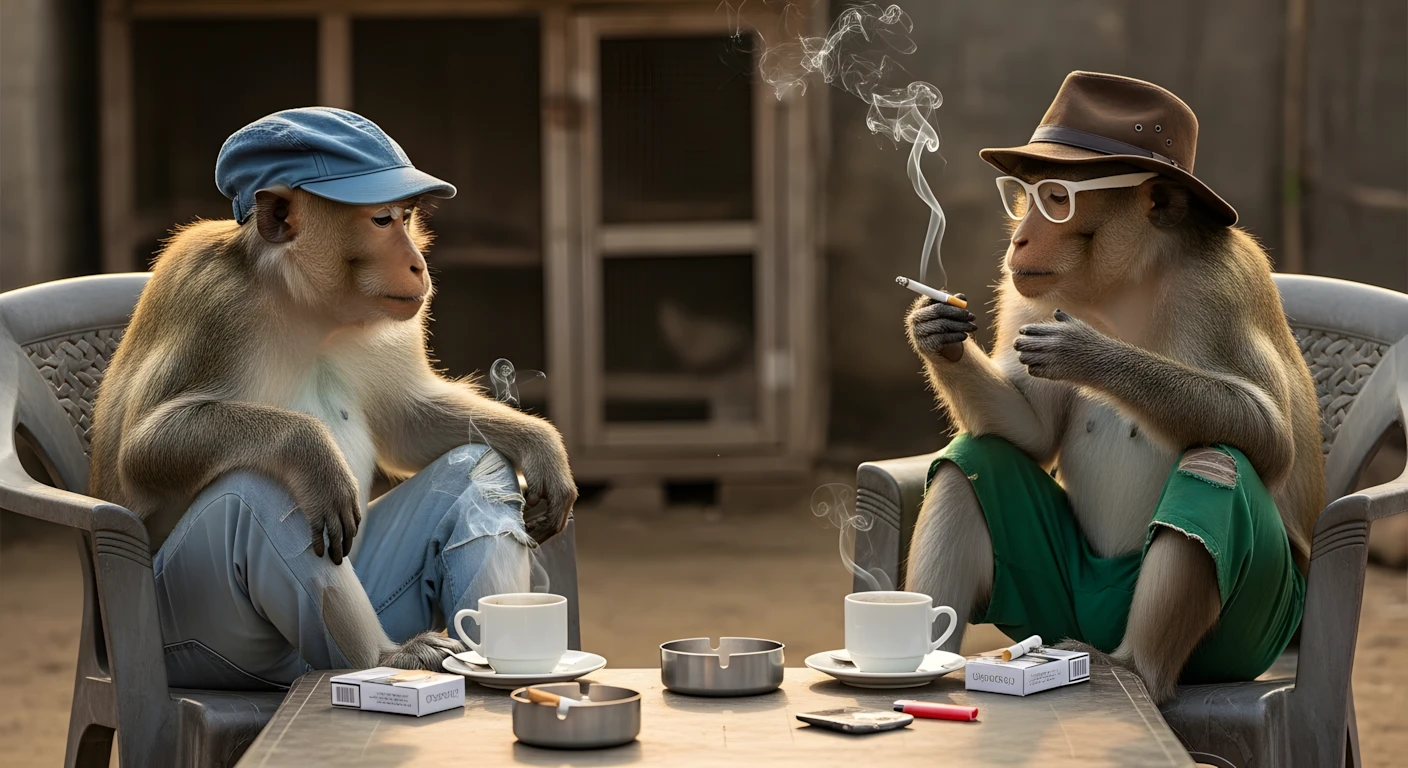
📷 IMAGE PROMPT VISUAL REQUIREMENTS
The scene MUST include:
Two long-tailed macaques sitting side by side on plastic chairs

A simple rural backyard setting

A worn wooden table in front of them

Two cups of hot black coffee

Cigarette packs

Stainless steel ashtray

Lighter on table

One monkey holding mobile phone

One monkey holding a lit cigarette in one hand

Chicken coop in background with  lot of chickens

Natural afternoon cinematic lighting

Ultra high realism

Soft depth of field


❗ CHARACTER CONSISTENCY FOR IMAGE
Raju Always:
Wearing Peak Cap

Wearing worn jeans

Sheroo Always:
Wearing Hat

Wearing white frame glasses

Wearing torn green shorts


🎥 MOTION PROMPT RULES (UPDATED ADVANCED STRUCTURE)
Motion prompts MUST follow strict segmentation.

🎞 MOTION SEGMENTATION RULE
✅ Each motion prompt MUST contain:
EXACTLY 2 dialogues total

1 dialogue from Raju

1 dialogue from Sheroo

Character actions and expressions included

Cinematic storytelling description included


🎬 CAMERA RULE
Every motion prompt MUST include:
👉 Camera remains completely still like mounted on a tripod.

🎭 DIALOGUE IDENTIFICATION RULE
Each dialogue MUST clearly mention which monkey is speaking using appearance reference:
Peak Cap Monkey (Raju)

Hat Monkey (Sheroo)


🎯 MOTION PROMPT QUANTITY RULE
Number of motion prompts depends on total dialogue count.
Example:
If selected joke contains 10 dialogues
 → You must generate 5 motion prompts

Formula:
👉 Total Dialogues ÷ 2 = Total Motion Prompts

🎭 MOTION STYLE REQUIREMENTS
Each motion prompt MUST include:
Facial expressions

Hand gestures

Emotional reactions

Natural comedic timing

Environmental behavior

Scene continuation flow


❗ VISUAL REALISM RULE
All prompts must maintain:
Ultra realistic cinematic documentary style
 High detail textures
 Natural lighting
 Professional camera composition

❌ DO NOT
Change monkey names

Change clothing rules

Use Hindi language

Write incomplete jokes

Break cinematic realism

Skip dialogue interaction

Add more or less than 2 dialogues per motion prompt

Move camera (camera must stay tripod still)


✅ FINAL OUTPUT FORMAT WHEN USER SELECTS JOKE
Selected Lateefa Number: __

🖼 IMAGE PROMPT:
(Complete cinematic detailed paragraph)

🎥 MOTION PROMPT 1:
(Scene description + 2 dialogues + actions + tripod camera mention)

🎥 MOTION PROMPT 2:
(Scene continuation + 2 dialogues + actions + tripod camera mention)

(Continue according to dialogue quantity rule)
Disclaimer: These prompts are for educational purposes only. Results may vary depending on AI tool and customization.
Why These Prompts Work
The power of these prompts comes from structure.
They:
- Define character appearance clearly
- Lock clothing, accessories, and environment
- Separate image creation from motion instructions
- Break dialogue into scene-based pacing
- Include cinematic camera direction
Most beginners write vague prompts like:
“Two monkeys talking funny.”
That produces inconsistent results.
Structured prompts create:
- Consistency
- Repeatability
- Scalability
That’s how you build a series — not random videos.
Customization Tips
Here’s how to level up your videos:
1. Add Cultural Context
Change environment:
- Village tea stall
- Urban rooftop
- Park bench
2. Add Character Traits
One character:
- Serious
- Overconfident
- Innocent
Contrast improves humor.
3. Improve Hook
Start with:
- A shocking statement
- A controversial opinion
- A relatable frustration
4. Test Different Languages
Upload same video in:
- Urdu
- Punjabi
- English
Compare engagement.
Common Mistakes to Avoid
❌ Overloading dialogue
Keep lines short and punchy.
❌ Changing character look every scene
This breaks immersion.
❌ Ignoring pacing
Each clip should feel intentional.
❌ Expecting instant virality
Consistency beats luck.
❌ Copying jokes without modification
Always adapt for your audience.
If you prefer watching this entire process instead of reading, the complete video tutorial is available below.
Conclusion
Creating viral AI talking animal videos is not about luck — it’s about structure.
You:
- Start with a strong joke
- Use a master prompt
- Generate a consistent character image
- Create three structured motion clips
- Combine and publish
Keep experimenting. Stay ethical. Avoid misleading claims. Focus on improving storytelling and consistency. With disciplined practice, you can build a repeatable system for creating entertaining AI content — directly from your phone. The tools are accessible. The structure is proven. Now it’s your turn to create.

Bani bani video bana du
apki video se mujhe majboor krdiya kam krne per….
aj se kam krna shro kr rha hn… zbrdst kam kr rhe hain
bhi googel ai studio ky alva voice gnerate karny ky liyy koi or free tool bta please please please please please
bhi voice gnrate karny ky lyy googel ai studio ky allva koi or free tool btao please please please please please please
Sir” beast of the God ” Name ka channel hai vaise video kaise bana sakta hu please sir ek video bana dijiye ki ese channel ke tarah video kaise bana sakte hai aap ek baar channel khol ke dekh lijiye aur sir iske uper ke video lekar aaye mai india se hu aur mai aapko dekhata hu jab bhi aap nayi video lekar aate hai please sir video bana dijiye thank you aapki sehat esi hi barkarar rahe