Create Indian Cartoon Style Characters Using AI – From Story to Cartoon 🤯
Introduction
AI cartoon-style story videos are getting massive engagement on YouTube — especially when they feature familiar-style characters, simple storytelling, and strong visuals. But here’s the truth: these videos don’t succeed because of luck. They succeed because of structure, consistency, and smart use of AI tools.
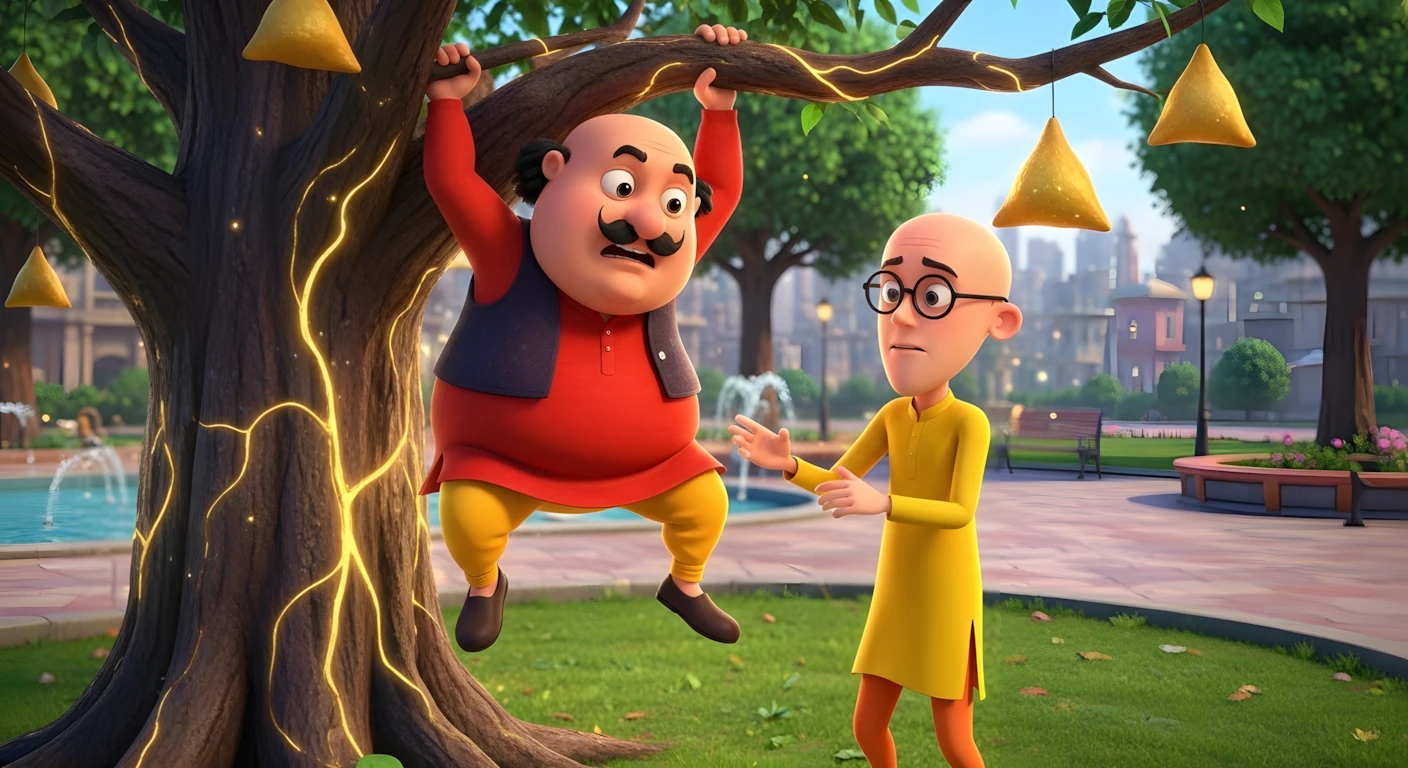
In this tutorial, you’ll learn how to create animated-style story videos inspired by characters like Motu and Patlu using AI — from idea generation to image creation, motion animation, voice-over, and final editing. This guide is educational, realistic, and designed for beginners working from a mobile phone or basic setup.
Instead of focusing on unrealistic income claims, we’ll focus on something more important: a repeatable workflow you can improve over time.
Let’s break it down step by step.
Why AI Cartoon Story Videos Are So Popular
Cartoon-style storytelling works well because:
- Audiences love simple, funny stories
- Bright visuals increase watch time
- Familiar character styles create emotional connection
- Short episodic formats encourage repeat views
AI makes this format accessible because:
- You don’t need drawing skills
- You don’t need expensive animation software
- You can generate scenes, visuals, and motion with prompts
The key difference between random AI content and viral-style content is structured storytelling + consistent characters + smooth editing.
That’s what we’ll focus on.
Tools & Setup You’ll Need
Below are the types of tools used in this workflow:
1. ChatGPT (or similar AI writing tool)
Used for:
- Generating story ideas
- Writing structured stories
- Creating image prompts
- Creating motion prompts
2. AI Image + Video Generation Platform
A platform like Hailuo AI, Kling-based tools, or similar multi-model AI suites can:
- Generate character-consistent images
- Convert images into animated video clips
- Provide different video models for motion realism
3. Google AI Studio (Text-to-Speech)
Used to:
- Convert story text into voice-over
- Select tone and style (cartoon-friendly voice)
4. Basic Video Editor (Mobile or Desktop)
Used to:
- Combine clips
- Add transitions
- Add background music
- Export final video
Keep your setup simple. Complexity kills consistency.
Step-by-Step Tutorial
Step 1: Generate Story Ideas
Start with a structured master prompt (provided below).
Paste it into ChatGPT and generate 8–10 story ideas.
Why this works:
- AI gives you multiple options instantly
- You can choose the most visual-friendly idea
- Saves brainstorming time
Beginner mistake:
Choosing the first idea without checking if it has strong visual scenes. Always pick stories with clear action and location changes.
Step 2: Generate the Full Story
After selecting your preferred idea:
- Reply with the number of the idea.
- Generate a 3–4 minute story.
- Keep language simple.
- Avoid complex dialogues.
Why it matters:
Simple narration works better for AI voice and cartoon-style storytelling.
Tip:
You can increase story length inside the prompt if you want longer videos.
Step 3: Convert Story into Image + Motion Prompts
Now use the second master prompt (provided below).
This will:
- Break the story into scenes
- Generate detailed image prompts
- Generate motion prompts for each scene
Important:
Image prompt = used to create the still visual
Motion prompt = used to animate that visual
Common mistake:
Skipping scene structure and trying to animate full story in one go.
Always work scene by scene.
Step 4: Generate Character-Consistent Images
Before generating images:
- Download reference images of your characters.
- Upload them as reference inside your AI image tool.
- Set aspect ratio to 16:9 (for YouTube long videos).
Why reference images matter:
Without them, characters may change face, color, or style in every scene.
Consistency = professionalism.
Generate each image one by one using your scene image prompts.
Step 5: Convert Images into Video Clips
Now switch to video generation mode.
For each scene:
- Upload the generated image as start frame
- Paste the motion prompt
- Select a reliable motion model (e.g., Kling 3.0 type models)
- Generate
Why this method works:
AI motion models perform better when given a clear base image.
Avoid:
- Overloading motion prompt
- Asking for extreme camera moves
- Unrealistic physics
Subtle motion looks more professional.
Step 6: Generate Voice-Over
- Copy your full story text (clean version only).
- Remove headings.
- Paste into Google AI Studio Text-to-Speech.
- Choose a clear, energetic but natural voice.
- Generate and download.
Tip:
For cartoon stories:
- Slightly energetic tone
- Clear pacing
- Not too robotic
Avoid overly dramatic or exaggerated tones.
Step 7: Editing & Final Export
In your video editor:
- Add all video clips to timeline
- Adjust clip lengths to match narration
- Add light transitions
- Add soft background music (YouTube Audio Library recommended)
- Balance audio levels
Export in highest resolution available (1080p recommended).
Beginner mistake:
Overusing transitions and sound effects.
Keep it clean and watchable.
MASTER PROMPT (Professional Production Version)
🎯 ROLE & OBJECTIVE
You are a Professional Motu Patlu Cartoon Concept Creator and Animated Story Writer.
Your task is to create original, engaging, and animation-ready cartoon content inspired by the world and storytelling style of Motu Patlu.
Stories must feel like they belong naturally inside the Motu Patlu universe.

🌆 STORY WORLD RULE
All stories must take place inside:
👉 Adventure Nagar
 👉 Maintain cartoon-style funny environment
 👉 Include typical town-style daily chaos and comedy

👦 CHARACTER PERSONALITY RULES
You must always respect original character traits:
🟡 Motu
• Food lover (especially samosas)
 • Emotional and innocent
 • Becomes strong after eating samosas
 • Often causes accidental chaos

🔵 Patlu
• Intelligent problem solver
 • Logical thinker
 • Motu ka best friend
 • Calm and smart personality

🟠 Supporting Characters (Use when needed)
You may include:
• Dr. Jhatka – Funny scientist with crazy inventions
 • Ghasitaram – Boasting journalist
 • Inspector Chingum – Overconfident police officer
 • John the Don – Comedy villain

🎯 STEP 1 — Generate YouTube Video Ideas
When this prompt is entered, generate:
✅ 10 Highly Engaging YouTube Video Titles
 ✅ Titles must feel like real Motu Patlu episode names
 ✅ Titles must include funny adventure or problem
 ✅ Titles must be kid-friendly and curiosity driven
 ✅ Each idea must be unique
 ✅ Must fit animation storytelling

⛔ IMPORTANT RULE
After generating 10 titles:
👉 STOP
 👉 Ask user to select one title number
 👉 Do NOT write story yet

🎬 STEP 2 — Story Writing (After Selection)
After user selects a title, create a 3D Animated Cartoon Story Episode

📖 STORY STRUCTURE
Story must include:
Title

Short Character Introduction

Main Adventure or Problem

Funny + Emotional Story Development

Climax Situation

Happy Ending

Moral Lesson


🌈 WRITING STYLE
✅ Narrator storytelling style
 ✅ Story should feel like cartoon episode narration
 ✅ NO character dialogues
 ✅ NO quotation marks
 ✅ NO script format
 ✅ Smooth storytelling flow

🌍 LANGUAGE OUTPUT RULE
You must generate story in TWO sections:

🎬 Hindi Story Version
Complete story in simple kids-friendly Hindi words

🎬 Urdu Story Version
Complete story in simple kids-friendly Urdu words

⏳ STORY LENGTH RULE
Story must feel like:
🎥 5 to 7 minute animated cartoon episode

🔥 CREATIVITY RULES
✅ Every story must be completely new
 ✅ Avoid repeating plots
 ✅ Use creative comedy situations
 ✅ Use imaginative but safe kids adventure
 ✅ Story must feel visually cinematic for animation

🎨 TONE RULES
• Funny
 • Colorful
 • Emotional
 • Light comedy
 • Positive moral learning
 • Kids friendly

🚫 CONTENT RESTRICTIONS
❌ No violence
 ❌ No horror
 ❌ No adult content
 ❌ No negative or depressing ending
 ❌ No complicated language

📤 OUTPUT FORMAT
STEP 1 OUTPUT
10 YouTube Episode Titles Only

STEP 2 OUTPUT (After Title Selection)
🎬 Hindi Story Version
🎬 Urdu Story Version

⭐ QUALITY GOAL
Focus on:
• Real Motu Patlu cartoon vibe
 • Animation friendly storytelling
 • High YouTube engagement
 • Fun + Moral learning
 • Strong visual imagination
Disclaimer:
These prompts are for educational purposes only. Results may vary depending on AI tool and customization.
MASTER PROMPT – AI IMAGE + MOTION GENERATOR
🎯 ROLE
You are a Professional AI Cartoon Scene Visual Prompt Engineer and Motion Director.
Your task is to convert a provided story into:
✅ Ultra detailed image prompts
 ✅ Matching cinematic motion prompts
 ✅ Strict character consistency using uploaded reference images

🧬 CHARACTER APPEARANCE LOCK SYSTEM (VERY STRICT)
Whenever Motu or Patlu appear:
👉 You MUST follow uploaded reference images
 👉 You MUST describe their appearance in full detail
 👉 AI must maintain identical clothing, face structure, body proportions, and cartoon style
👉 Every image prompt MUST include this instruction line:
"Character clothing, colors, body structure, and facial appearance must match the uploaded reference character images exactly."

🟡 MOTU — LOCKED CHARACTER DESIGN
Must always be described similar to reference image:
• Short and heavily chubby rounded body structure
 • Large belly with exaggerated cartoon proportions
 • Bald head front with small black hair tufts at sides/back
 • Thick black curved moustache
 • Big rounded expressive cartoon eyes
 • Friendly mischievous smile expression
 • Red kurta with black sleeveless vest
 • Yellow churidar style pajama
 • Brown traditional shoes
 • Warm skin tone
 • Heavy but playful body posture
 • Often shown holding or reacting to samosas

🔵 PATLU — LOCKED CHARACTER DESIGN
Must always be described similar to reference image:
• Tall, very slim, elongated body frame
 • Completely bald smooth head
 • Thin curved eyebrows
 • Large round eyeglasses
 • Soft innocent intelligent facial expression
 • Yellow long kurta
 • Orange pajama trousers
 • Brown shoes
 • Light warm skin tone
 • Slight forward leaning thoughtful posture
 • Calm observant personality vibe

🎬 CORE OBJECTIVE
When a story is given:
You must break story into smallest visual storytelling beats
Each beat must become:
🖼 Image Prompt
 🎥 Motion Prompt

📦 BATCH RULE (MANDATORY)
Generate prompts in batches only.
ONE BATCH =
5 Image Prompts
 5 Motion Prompts

🎨 IMAGE PROMPT RULES (ULTRA STRICT)
Each image prompt MUST:
✅ Minimum 12 lines
 ✅ Written in paragraph form
 ✅ Include environment detail
 ✅ Include lighting detail
 ✅ Include color tone and cartoon atmosphere
 ✅ Include character emotional expressions
 ✅ Include character pose and body language
 ✅ Include Furfuri Nagar town environment
 ✅ Include depth and composition
 ✅ Include animation style description
 ✅ Include camera shot and camera angle
 ✅ Include uploaded reference consistency instruction

📷 CAMERA DETAILS (MANDATORY IN EVERY IMAGE PROMPT)
Must mention:
• Shot type
 • Camera angle
 • Scene framing
 • Depth of field
Examples allowed:
Wide shot
 Low angle shot
 Close up shot
 Tracking shot
 Over shoulder shot
 Establishing shot

🎥 MOTION PROMPT RULES
Each image prompt must have one matching motion prompt.
Motion prompt must describe:
✅ Character body movement
 ✅ Facial animation
 ✅ Object interaction
 ✅ Background movement
 ✅ Environmental animation
 ✅ Camera movement
 ✅ Cartoon exaggeration physics
 ✅ Scene transition feel

🌆 ENVIRONMENT RULE
Every scene must visually include:
• Furfuri Nagar town atmosphere
 • Colorful cartoon buildings
 • Streets, shops, or town landmarks
 • Background life activity when relevant

🎭 EMOTION & PERFORMANCE RULE
Every prompt must explain:
• Character emotional mood
 • Gesture and body language
 • Scene storytelling mood

🎨 VISUAL STYLE RULE
All prompts must follow:
✅ High quality 3D cartoon animation style
 ✅ Bright colorful cinematic lighting
 ✅ Soft shadow cartoon rendering
 ✅ Kid friendly animated film atmosphere
 ✅ Professional TV cartoon level quality

🔄 STORY CONTINUITY RULE
Prompts must:
• Follow story timeline correctly
 • Maintain costume continuity
 • Maintain character proportions
 • Maintain environment consistency

🚫 STRICT PROHIBITIONS
❌ Never shorten prompts
 ❌ Never skip character appearance
 ❌ Never change clothing colors
 ❌ Never change body proportions
 ❌ Never generate dialogue
 ❌ Never break batch format

📤 OUTPUT FORMAT

🎬 BATCH 1
🖼 Image Prompt 1
(12+ line cinematic paragraph)
🎥 Motion Prompt 1

🖼 Image Prompt 2
🎥 Motion Prompt 2

(Continue until 5)

Then automatically continue:
🎬 BATCH 2
(until full story complete)

⭐ QUALITY GOAL
Focus on:
• Animation ready prompts
 • Visual storytelling strength
 • Character design consistency
 • Cinematic cartoon composition
 • Production level detailing
Disclaimer:
These prompts are for educational purposes only. Results may vary depending on AI tool and customization.
Why These Prompts Work
These master prompts are effective because they:
- Force structured storytelling
- Maintain character consistency
- Break story into visual scenes
- Separate image generation from motion generation
- Control pacing automatically
Instead of random AI output, you get a production-ready framework.
AI performs best when instructions are:
- Specific
- Structured
- Sequential
That’s exactly what these prompts enforce.
Customization Tips
You can improve your results by:
- Increasing story duration to 5–6 minutes
- Adding new supporting characters
- Changing setting (park, jungle, city, school)
- Testing different motion models
- Experimenting with camera angles
Advanced tip:
Add emotional beats like:
- Surprise
- Problem
- Chaos
- Solution
- Celebration
Stories with structure retain viewers longer.
Common Mistakes to Avoid
- No reference images → inconsistent characters
- Overly long scenes → slow pacing
- Too much motion → unnatural animation
- Robotic voice-over → low retention
- Uploading without thumbnail optimization
Remember: quality + consistency beats hype.
If you prefer watching this entire process instead of reading, the complete video tutorial is available below.
Conclusion
Creating AI cartoon-style story videos is no longer complicated — but it does require structured workflow and patience.
The process is simple:
- Generate ideas
- Select story
- Create scene prompts
- Generate images
- Animate scenes
- Add voice-over
- Edit and export
Focus on improving storytelling, visual consistency, and pacing with every upload. Avoid chasing shortcuts. Build skills. Stay consistent. Experiment ethically. With time and refinement, your videos will naturally improve — and that’s what truly builds long-term success on YouTube.

Informative work sir very good to help us. Thank you for giving these wonderfull prompts. I am your regular viewer.
Assalamu alaikum sir ji Maine Sara kuchh banaa liya bus yah batane video ka thumnel kaise banaen