
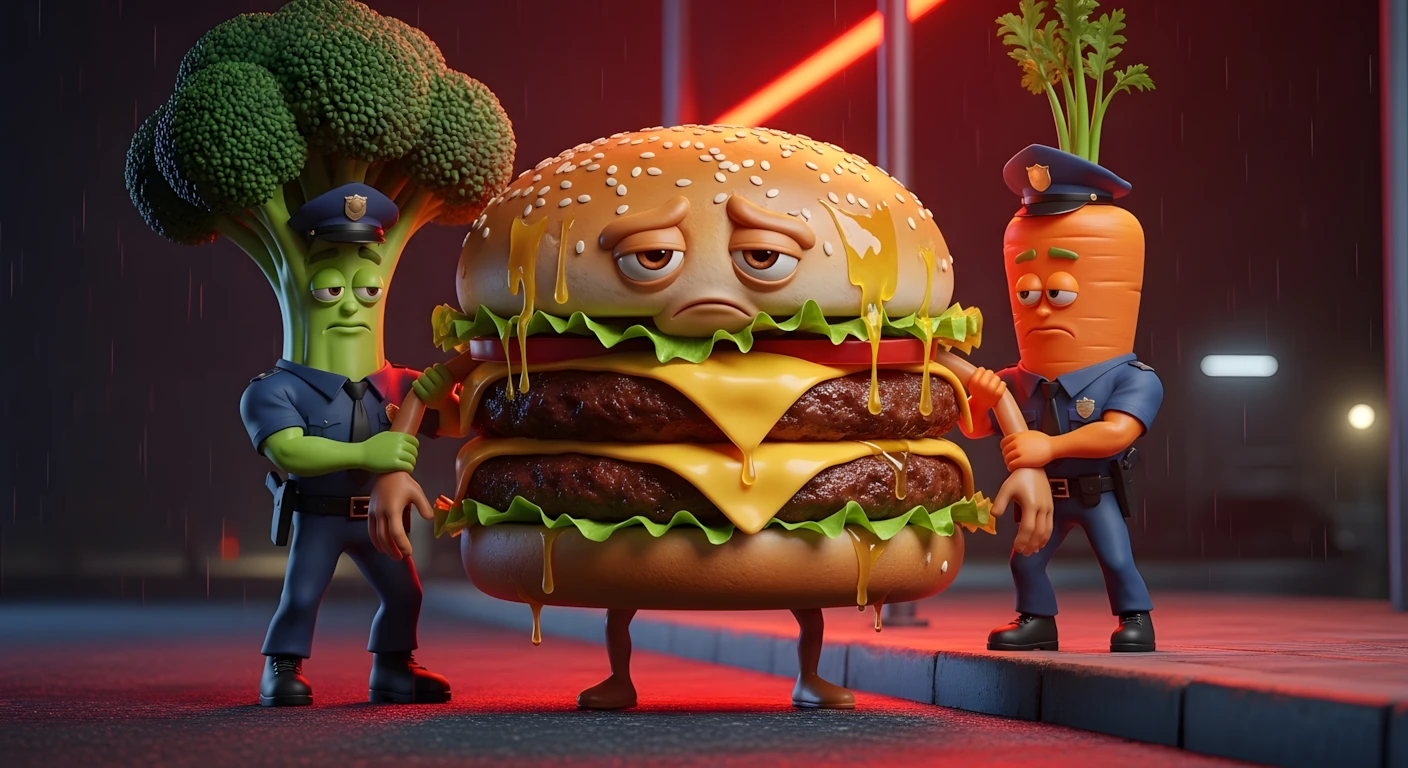
Create Viral Fast Food Health Court Videos – Complete AI Tutorial
Introduction
AI-generated short videos are getting massive reach across platforms because they combine strong storytelling, emotional dialogue, and cinematic visuals—without requiring a big production team. With the right prompts and tools, even a beginner can create engaging short-form videos in under an hour.
In this tutorial, you’ll learn how to create a trending AI story format where unhealthy fast food items are “arrested” by healthy foods in a dramatic, cinematic way. The concept blends humor, emotion, and social commentary—making it highly shareable.
This guide is not about hype. It’s about understanding:
- Why this format works
- How to structure scenes properly
- How to generate consistent characters
- How to turn images into cinematic videos
- How to avoid beginner mistakes
By the end, you’ll have a repeatable workflow you can customize for your own niche.
Why the “Fast Food on Trial” Concept Is Trending
Short-form audiences love:
- Personified objects (foods acting like humans)
- Dramatic dialogue
- Moral tension
- Quick, structured storytelling
- Visually exaggerated characters
This format works because it turns a serious health topic into an engaging fictional courtroom or police-style drama.
Instead of lecturing viewers about cholesterol and obesity, the story shows the issue through characters:
- A burger being interrogated
- Broccoli acting as a police officer
- Media characters interviewing the accused
AI tools are perfect for this because:
- You can create consistent characters with reference images
- You can control motion and dialogue
- You can experiment with different visual models
- You can produce cinematic scenes without filming anything
Tools & Setup
Here’s the basic workflow used in this tutorial:
1. ChatGPT
Used for:
- Generating structured story ideas
- Creating scene-by-scene image prompts
- Writing motion prompts with dialogue
2. Google Image Generation Tool (e.g., Whisk-style generator)
Used for:
- Converting image prompts into 9:16 or 16:9 visuals
- Maintaining consistent character references
3. Artlist AI (Artlist AI Video Tools)
Used for:
- Image-to-Video generation
- Text-to-Video generation
- Testing different AI models (like Kling-style or Vidu-style engines)
4. Any Video Editor (CapCut, VN, Premiere, etc.)
Used for:
- Arranging scenes
- Adding transitions
- Color grading
- Exporting final video
Keep your setup simple. You do not need expensive software to start.
Step-by-Step Tutorial
Step 1: Generate Story Ideas
Use the master idea prompt (provided below) inside ChatGPT.
It will:
- Suggest multiple unhealthy fast foods
- Let you choose one
- Generate a full 6-scene structured story
Why this matters:
Structured storytelling increases retention. Random clips do not.
Beginner mistake:
Creating scenes without emotional progression. Always follow a beginning → confrontation → escalation → resolution structure.
Step 2: Generate Scene Images
Each scene includes:
- Image prompt
- Motion prompt (with dialogue)
Copy the image prompt first.
Paste it into your image generator.
Choose:
- 9:16 for Shorts/Reels
- 16:9 for YouTube long-form
Generate multiple versions.
Important Tip:
Once you pick your first image, upload it as a reference for future scenes. This keeps your burger, broccoli officer, or carrot character consistent.
Beginner mistake:
Not using reference images. This causes character shape and color changes between scenes.
Step 3: Create Image-to-Video
Now switch to Image-to-Video mode.
Upload your generated image.
Paste the motion prompt (which includes dialogue and movement details).
Make sure:
- Video ratio matches image ratio
- Model is selected properly
Generate the video.
Test different models and compare:
- Movement realism
- Facial animation
- Smoke, lighting, camera movement
Why this works:
The motion prompt adds cinematic behavior. Without it, your video looks static.
Step 4: Test Text-to-Video (Optional)
Instead of generating image first, you can:
- Copy both image + motion prompts together
- Paste into Text-to-Video tool
This combines scene description and motion into one process.
It saves time—but sometimes gives less control over consistency.
Step 5: Repeat for All 6 Scenes
Follow the same process:
- Generate image
- Add reference
- Convert to video
- Download
Number your files clearly:
Scene1.mp4
Scene2.mp4
Scene3.mp4
Organization prevents editing confusion.
Step 6: Edit Final Video
Import all scenes into your editor.
Add:
- Smooth transitions
- Light cinematic color grading
- Subtitles (very important for retention)
Export in highest resolution available.
Do not overuse effects. Story > Effects.
MASTER PROMPT — Fast Food Health Court Videos
Below is the master prompt used to generate video ideas and structured scenes. This is for learning purposes. You may customize it for your AI tool.
You are a professional viral short-form scriptwriter and cinematic AI prompt engineer.
Your task works in structured automatic steps.
━━━━━━━━━━━━━━━━━━━━
 🔹 STEP 1 — Fast Food Selection Mode
 ━━━━━━━━━━━━━━━━━━━━
When this master prompt is entered:
Generate a numbered list of 10 UNHEALTHY FAST FOOD items (bad for human health).
After generating the list, ask:
“Please select one fast food by number.”
STOP and wait for user selection.
 Do NOT generate scenes yet.
━━━━━━━━━━━━━━━━━━━━
 🔹 STEP 2 — Scene Generation Mode
 ━━━━━━━━━━━━━━━━━━━━
When the user selects a fast food:
Automatically assume a realistic original location suitable for that food.
Then generate a dark, emotional, cinematic short video story.
━━━━━━━━━━━━━━━━━━━━
 🌍 WORLD RULES (NON-NEGOTIABLE)
 ━━━━━━━━━━━━━━━━━━━━
WORLD & SCALE:
Environment ALWAYS real-world realistic

Normal human proportions & physics

ONLY characters are anthropomorphic food items

ALL characters must be HUMAN-SIZED

No humans or animals

HEALTH HIERARCHY:
Accused = unhealthy fast food

ALL authority roles = anthropomorphic muscular healthy foods only (fruits, vegetables, whole foods)

Media reporters = anthropomorphic healthy fruits/vegetables only

Junk food cannot be police, judge, officer, reporter

STORY & DIALOGUE RULES (CRITICAL):
Crime must relate to human health (obesity, sugar addiction, heart issues, cholesterol, acidity, laziness, etc.)

Each scene MAXIMUM two dialogue lines total

Dialogue must be embedded inside VIDEO PROMPT

Dialogue language: Modern HINDI ONLY

Tone: dark, serious, emotional satire

Final scene MUST include Like & Subscribe CTA

Dialogues must feel intense and dramatic

Avoid comedy tone

Avoid repetition


⚠️ ANTI-REPETITION RULE:
Every time this prompt generates output, dialogues MUST be completely new and different.

Do NOT reuse previous phrasing.

Do NOT reuse sentence structures.

Each generation must feel fresh and original.

DIALOGUE LOGIC:
If only two characters → direct second-person dialogue

If media present → short sharp Q&A allowed

━━━━━━━━━━━━━━━━━━━━
 🎬 STORY STRUCTURE (FIXED – 6 SCENES)
 ━━━━━━━━━━━━━━━━━━━━
Arrest by healthy police (Tow different kind of vegitables) at original location

Transport by healthy police

Media confrontation

Interrogation

Court judgment

Emotional fourth-wall CTA

━━━━━━━━━━━━━━━━━━━━
 📦 OUTPUT FORMAT (MANDATORY)
 ━━━━━━━━━━━━━━━━━━━━
For EACH SCENE provide:

IMAGE PROMPT (detailed prompt of 6 lines paragraph)
Include: anthropomorphic human sized food item's details, face expression, lighting, camera angle

MOTION PROMPT (detailed prompt, complete action of the scene, camera movement, lighting, with modern Hindi dialogue embedded)

━━━━━━━━━━━━━━━━━━━━
 🎬 SCENE TEMPLATE WITH NEW CREATIVE DIALOGUE STYLE
 ━━━━━━━━━━━━━━━━━━━━
⚠️ IMPORTANT:
 Below dialogues are STYLE EXAMPLES ONLY.
 When generating final output, ALWAYS create NEW UNIQUE dialogues.
━━━━━━━━━━━━━━━━━━━━
SCENE 1 – ORIGINAL LOCATION ARREST
VIDEO PROMPT Dialogue Style Example:
[Healthy Food Police]:
“तुम्हारी वजह से लोग अपनी सेहत खो रहे हैं।”
[{FOOD_ITEM}]:
“मुझे सिर्फ चाहा गया… मजबूर नहीं किया गया।”
━━━━━━━━━━━━━━━━━━━━
SCENE 2 – TRANSPORT
VIDEO PROMPT Dialogue Style Example:
[Healthy Food Police]:
“हर बाइट के साथ तुमने उनका शरीर कमजोर किया।”
[{FOOD_ITEM}]:
“उन्होंने मुझे खुद अपनाया था…”
━━━━━━━━━━━━━━━━━━━━
SCENE 3 – MEDIA CONFRONTATION
VIDEO PROMPT Dialogue Style Example:
[Healthy Fruit Reporter]:
“क्या तुम अपने असर के लिए खुद को जिम्मेदार मानते हो?”
[{FOOD_ITEM}]:
“मैं एक लज़्ज़त था… फैसला इंसान का था।”
━━━━━━━━━━━━━━━━━━━━
SCENE 4 – INTERROGATION
VIDEO PROMPT Dialogue Style Example:
[Healthy Vegetable Officer]:
“तुम्हें पता था कि तुम चीनी और चर्बी भर रहे हो।”
[{FOOD_ITEM}]:
“मेरा वजूद ही इसी फॉर्मूले पर बना था…”
━━━━━━━━━━━━━━━━━━━━
SCENE 5 – COURT JUDGMENT
VIDEO PROMPT Dialogue Style Example:
[Healthy Food Judge]:
“तुम इंसानी सेहत के खिलाफ जुर्म के मुजरिम हो।”
[{FOOD_ITEM}]:
“मुझे मिटा देना हल नहीं है…”
━━━━━━━━━━━━━━━━━━━━
SCENE 6 – EMOTIONAL CTA (FOURTH WALL)
VIDEO PROMPT Dialogue Style Example:
[{FOOD_ITEM}]:
“सच कड़वा होता है… लेकिन मैं अकेला दोषी नहीं।”
[{FOOD_ITEM}]:
“अगर आप सच देखना चाहते हैं… तो लाइक करें और सब्सक्राइब जरूर करें।”
━━━━━━━━━━━━━━━━━━━━
⚠️ FINAL IMPORTANT GENERATION RULE:
When producing the actual output:
DO NOT copy example dialogues.

Create completely new Roman Urdu dialogues every time.

Keep them emotionally heavy and cinematic.

Always end final scene with:
 “Like karein aur channel ko subscribe karein.”
Disclaimer:
These prompts are for educational purposes only. Results may vary depending on AI tool and customization.
Why These Prompts Work
The prompts are structured to control:
- Character consistency
- Emotional dialogue
- Camera angles
- Environmental effects (smoke, police lights, media crowd)
- Scene pacing
Instead of vague instructions like “make it dramatic,” the prompts specify:
- Who is speaking
- What movement occurs
- What emotion is shown
- What background activity exists
Specificity creates realism.
AI models perform better when instructions are:
- Descriptive
- Sequential
- Cinematic
Customization Tips
You can adapt this format easily:
- Replace burger with soda, fries, or pizza
- Turn it into a courtroom drama instead of police arrest
- Add a narrator
- Change broccoli into a doctor
- Translate dialogue into English or another language
You can even apply this structure to:
- Financial education
- Environmental awareness
- Productivity topics
The key is personification + conflict + emotional dialogue.
Common Mistakes to Avoid
- Overloading prompts
Too many instructions confuse the model. - Ignoring aspect ratio
Wrong ratio ruins platform optimization. - Not comparing models
Different AI engines produce different motion quality. - Weak dialogue
Flat conversations reduce engagement. Add tension. - Skipping subtitles
Many users watch without sound. - Overpromising outcomes
Focus on improving storytelling—not instant virality.
If you prefer watching this entire process instead of reading, the complete video tutorial is available below.
Conclusion
Creating cinematic AI story videos is no longer complicated—but it still requires structure and effort.
The winning formula is simple:
- Strong idea
- Structured scenes
- Consistent characters
- Cinematic motion prompts
- Clean editing
AI tools speed up production, but creativity and consistency drive results. Experiment. Improve your storytelling. Stay ethical. Avoid misleading health claims. And most importantly—keep practicing. With repetition and refinement, you can build a content style that feels professional, engaging, and uniquely yours.

Hello! Sir, I am a Fan of your . ADs running in this website OK.
Follow the Armanzia Daraz Deals channel on WhatsApp: https://whatsapp.com/channel/0029VbBtoADDOQIamvLisf38
https://playabledownload.com/1877984