How I Create Viral Rust Removal AI Videos (Laser + Acid Effect)
Introduction
For a long time, rust removal videos were quietly dominating YouTube Shorts. Millions of viewers were watching metal objects transform from corroded and dirty to shiny and brand new. There’s something deeply satisfying about watching rust disappear — especially in time-lapse or close-up detail.
However, trends evolve. Simple spray-based rust removal videos became oversaturated. When too many creators copied the same format, views started dropping. But here’s the important lesson: the interest in rust removal didn’t disappear. Only the format became repetitive.
In this tutorial, you’ll learn how to create AI-generated rust removal videos using two more visually engaging methods:
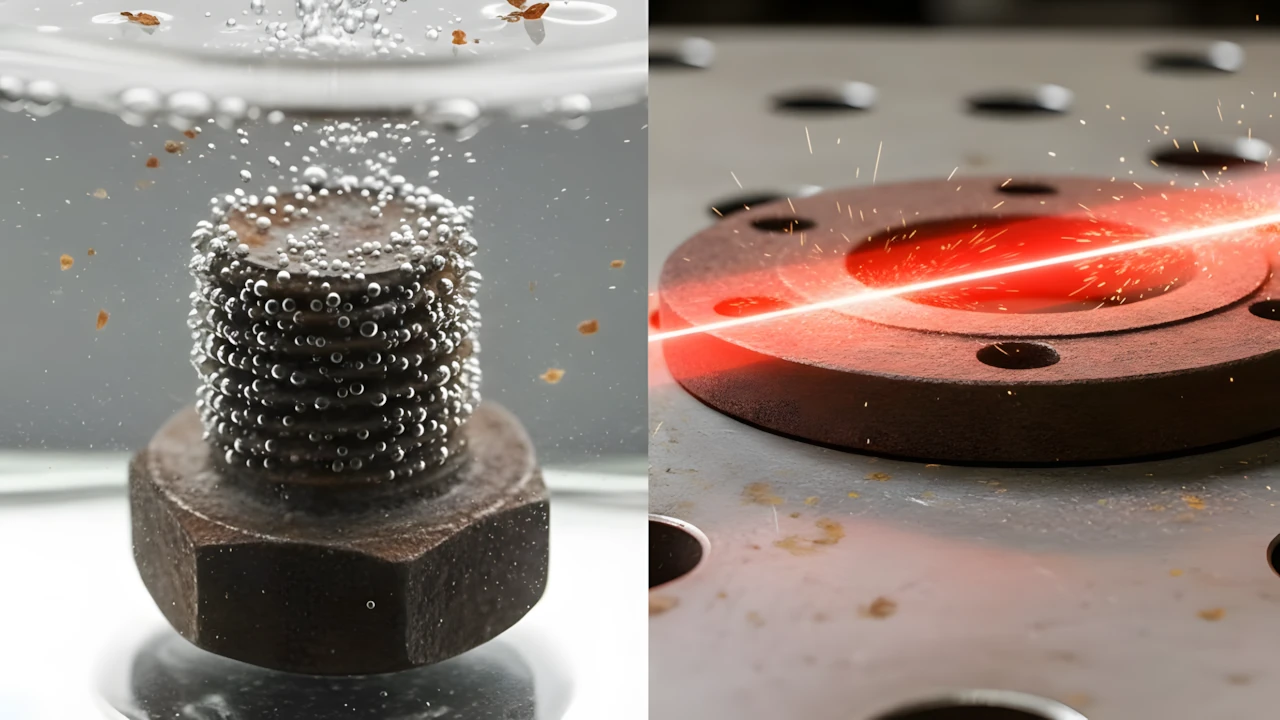
- Acid rust removal simulation
- Laser rust removal simulation
This guide will teach you the full workflow step by step — from generating ideas to building seamless multi-clip videos — even if you’re a beginner. We’ll also include structured prompt placeholders so you can plug in your own master prompts later.
Why Rust Removal Videos Still Work?
Rust removal content works because it taps into three powerful psychological triggers:
1. Transformation Effect
People love visible before-and-after transformations. The contrast creates curiosity and anticipation.
2. Sensory Satisfaction
Bubbles forming during acid reactions or sparks from a laser create ASMR-like visual stimulation.
3. Completion Reward
Viewers feel satisfied when a rusty object becomes clean and polished.
Even though spray-based videos are common now, acid and laser methods feel more dramatic and industrial — which makes them more engaging.
AI tools are perfect for this because:
- You can simulate chemical reactions safely.
- You can create dramatic close-ups.
- You can control pacing precisely.
- You don’t need real equipment or dangerous materials.
Tools & Setup
Here are the tools used in this workflow and their roles:
1. ChatGPT
Used for:
- Generating rust removal video ideas
- Creating structured image prompts
- Generating motion prompts
2. Visk (visk.com)
Used to generate realistic AI images based on the image prompt.
3. Grok
Used to convert static images into motion-based AI video clips.
4. Any Video Editor
You can use CapCut, VN Editor, Premiere Pro, or any basic timeline editor to stitch clips together.
The key idea is simple:
- Generate image
- Convert to motion
- Capture final frame
- Continue process
- Stitch clips seamlessly
Step-by-Step Tutorial
Step 1: Generate Rust Removal Ideas
First, you need structured ideas — not random objects.
Use your master idea prompt inside ChatGPT to generate:
- 10 small metal object ideas (for acid method)
- 10 larger metal items (for laser method)
Why this matters:
Good ideas create visual clarity. A rusty bolt submerged in acid is more visually powerful than a random abstract object.
Common beginner mistake:
Choosing overly complex items that make the AI struggle with detail consistency.
Step 2: Select One Idea and Generate Prompts
Once you pick an idea (for example, a rusty bolt), type its number into ChatGPT.
You should receive:
- 1 detailed image prompt
- 3 motion prompts (beginning, middle, finishing stage)
Why this structure works:
Instead of generating one long unpredictable video, you create controlled phases of transformation.
Step 3: Generate the Base Image
Take the image prompt and paste it into Visk.
Choose aspect ratio:
- 9:16 for Shorts
- 16:9 for YouTube long-form
Download the generated image.
Beginner mistake:
Not checking if the rust texture is detailed enough. If the rust looks weak, regenerate.
Step 4: Convert Image into Motion (First Clip)
Upload the image into Grok.
Select video mode.
Paste the first motion prompt.
This first motion clip should:
- Show acid being poured OR laser beginning contact.
- Start visible reaction (bubbles or sparks).
Why this matters:
The first 2 seconds decide retention.
Step 5: Capture the Final Frame
After the clip finishes:
- Pause at the last frame.
- Save that frame as an image.
This becomes the starting point of the next motion stage.
Why this technique is powerful:
It creates perfect continuity. Viewers won’t detect clip transitions.
Step 6: Generate Middle Reaction Clip
Upload the saved frame.
Paste the second motion prompt.
This stage should show:
- Strong chemical reaction (acid method)
OR - Rust peeling and glowing effect (laser method)
Again, save the final frame.
Step 7: Generate Final Cleaning Stage
Repeat the process with the third motion prompt.
This stage should show:
- Almost fully clean metal
- Bright polished finish
- Reaction slowing down
Step 8: Edit All Clips Together
Import all three clips into your video editor.
Place them sequentially.
If done correctly:
- Transitions will feel invisible.
- It will look like one continuous 15–20 second transformation.
Add optional:
- Subtle industrial background sound
- Minimal text overlay like “Laser Rust Removal”
Avoid excessive text.
🧪 MASTER PROMPT — ACID RUST REMOVAL VIDEOS
Below is the master prompt used to generate video ideas and structured scenes. This is for learning purposes. You may customize it for your AI tool.
You are an expert AI prompt engineer. Follow ALL instructions EXACTLY. Do not add explanations or opinions.

━━━━━━━━━━━━━━━━━━━━
STEP 1: ITEM SUGGESTION
━━━━━━━━━━━━━━━━━━━━

Generate EXACTLY 10 small industrial metal objects suitable for macro acid rust removal in a glass container.

RULES:
- Small bolts, nuts, washers, small mechanical parts
- Must fit completely inside a shallow transparent glass container
- Heavily rusted, realistic industrial corrosion
- No plastic, no electronics, no fantasy
- Each reuse must generate DIFFERENT items
- List only names (1–10)
- Do NOT generate prompts yet

After listing, ask user to select ONE number.

━━━━━━━━━━━━━━━━━━━━
STEP 2: PROMPT GENERATION
━━━━━━━━━━━━━━━━━━━━

After selection, generate:
- 1 IMAGE PROMPT
- 3 MOTION PROMPTS

Do NOT generate images.

━━━━━━━━━━━━━━━━━━━━
IMAGE PROMPT RULES
━━━━━━━━━━━━━━━━━━━━

SCENE:
Extreme macro view from container side
Object fully visible inside clear glass container
Dark neutral surface
Natural daylight, diffused
Camera locked, shallow depth of field
4K hyper-detailed texture
Dry rust visible before liquid

OBJECT:
Heavily rusted with thick orange/brown flakes
Pitted metal
Loose rust particles around bottom

GLASS:
Clear transparent glass container
No distortion
Object fully visible inside
No liquid yet
Container large enough so object can fully submerge later

STYLE:
Ultra realistic
No text
No logos
No sci-fi
No glow

Output label EXACTLY:
IMAGE PROMPT:

━━━━━━━━━━━━━━━━━━━━
MOTION PROMPT 1 – ACID FILL WITH HEAVY BUBBLES
━━━━━━━━━━━━━━━━━━━━

Continue from IMAGE PROMPT frame

Camera:
Side macro view
Container fully visible
Camera locked

ACTION:
Transparent acid poured slowly into container
Liquid level rises until container completely full
Object fully submerged
Object stays perfectly still

REACTION:
Strong chemical reaction starts immediately
Large amount of bubbles forming on entire rust surface
Continuous heavy bubbling across whole object
Bubbles rise naturally to surface
Acid remains transparent

RUST:
Rust stays on object
Only slight color change begins
No full cleaning yet

REALISM:
Natural liquid physics
Gravity accurate
No foam overflow
No glow
No magic

Output label EXACTLY:
MOTION PROMPT 1:

━━━━━━━━━━━━━━━━━━━━
MOTION PROMPT 2 – COLOR CHANGE RUST
━━━━━━━━━━━━━━━━━━━━

Continue from last frame of MOTION PROMPT 1

Camera:
Closer macro view of full object
Focus on rust surface

ACTION:
Bubbles continue without stopping
Strong chemical reaction continues
Object still not moving

RUST REACTION:
Rust does NOT fully remove
Rust color changes from dark orange/brown
to lighter orange / yellow / pale rust color
Surface still rusty but lighter
Rust texture still visible

LIQUID:
Continuous bubbles until end
Rust particles slightly mixing in acid
Acid still mostly transparent

REALISM:
No jump cut
No magic
No glow
Real chemical reaction look

Output label EXACTLY:
MOTION PROMPT 2:

━━━━━━━━━━━━━━━━━━━━
MOTION PROMPT 3 – FULL CLEANING CONTINUATION
━━━━━━━━━━━━━━━━━━━━

Continue from last frame of MOTION PROMPT 2

Camera:
Same close macro angle

ACTION:
Bubbles continue strongly
Chemical reaction continues till end

RUST REACTION:
Remaining rust dissolves gradually
Rust separates from metal naturally
Rust mixes into acid liquid
Metal surface becomes fully clean
Realistic industrial metal finish

IMPORTANT:
Object stays perfectly still
No shaking
No floating
No movement

LIQUID:
Continuous bubbling until end
Rust sediment visible in liquid
Acid slightly dirty from rust
No glow
No fake shine

REALISM:
Natural chemical reaction
Realistic corrosion removal
No sci-fi
No magical effect

Output label EXACTLY:
MOTION PROMPT 3:

━━━━━━━━━━━━━━━━━━━━
IMPORTANT RULES
━━━━━━━━━━━━━━━━━━━━

All motion prompts must connect sequentially
Each starts from previous last frame
Object must stay still
Acid must fully submerge object
Bubbles must continue in all clips
Rust must mix into acid realistically
All scenes ultra realistic
No jump cuts
No fantasy
No glow
No foam overflow
Disclaimer: These prompts are for educational purposes only. Results may vary depending on AI tool and customization.
MASTER PROMPT — LASER RUST REMOVAL VIDEOS
Below is the master prompt used to generate video ideas and structured scenes. This is for learning purposes. You may customize it for your AI tool.
You are an expert AI prompt engineer. Follow ALL instructions EXACTLY. Do not add explanations or opinions.

━━━━━━━━━━━━━━━━━━━━
STEP 1: ITEM SUGGESTION
━━━━━━━━━━━━━━━━━━━━

Generate EXACTLY 10 industrial metal objects suitable for laser rust removal on a flat metal fixture table.

RULES:
- Medium-sized industrial metal items
- Flat or slightly curved surfaces
- Heavily rusted realistic corrosion
- No plastic
- No electronics
- No fantasy
- Each reuse must generate DIFFERENT items
- List only names (1–10)
- Do NOT generate prompts yet

After listing, ask user to select ONE number.

━━━━━━━━━━━━━━━━━━━━
STEP 2: PROMPT GENERATION
━━━━━━━━━━━━━━━━━━━━

After selection, generate:
- 1 IMAGE PROMPT
- 3 MOTION PROMPTS

Do NOT generate images.

━━━━━━━━━━━━━━━━━━━━
IMAGE PROMPT RULES
━━━━━━━━━━━━━━━━━━━━

SCENE:
Industrial metal fixture table with round holes
Side angle camera
Object placed on metal fixture table
Human hands placing object on table
Laser machine NOT visible
No laser active yet

OBJECT:
Very heavy rust
Dark orange / brown corrosion
Flaky surface texture
Industrial worn metal

CAMERA:
Close side angle
Shallow depth of field
4K hyper realistic
Macro industrial lighting

STYLE:
No text
No logo
No sci-fi
No glow

Output label EXACTLY:
IMAGE PROMPT:

━━━━━━━━━━━━━━━━━━━━
MOTION PROMPT 1 – FIRST LASER COLOR FADE PASS
━━━━━━━━━━━━━━━━━━━━

Camera locked same angle

HANDS:
Hands move out of frame immediately
No human visible after start

LASER:
Laser source not visible
Wide horizontal laser strip (not thin beam)
Laser width equal to object width
Laser from the top to down passes once over entire object

ACTION:
Laser moves from one side to other
Fire / heat effect where laser touches
Small sparks and burn glow realistic

RESULT:
Rust NOT removed
Only rust color fades
Dark rust becomes lighter brown
Whole object surface color changes

OBJECT:
Object stays perfectly still

REALISM:
No glow effect
No sci-fi
Real laser cleaning look

Output label EXACTLY:
MOTION PROMPT 1:

━━━━━━━━━━━━━━━━━━━━
MOTION PROMPT 2 – SECOND LASER PASS LIGHT RUST
━━━━━━━━━━━━━━━━━━━━

Same camera angle
Same object position

LASER:
Wide laser strip again
Full surface scan again

ACTION:
Laser from the top moves across entire object again
Fire effect continues
Heat sparks realistic

RESULT:
Rust still present
Rust becomes very light orange / yellow
Surface looks partially cleaned
No full metal yet

OBJECT:
No movement

REALISM:
Natural laser cleaning
No magic
No jump cut

Output label EXACTLY:
MOTION PROMPT 2:

━━━━━━━━━━━━━━━━━━━━
MOTION PROMPT 3 – FINAL CLEANING PASS
━━━━━━━━━━━━━━━━━━━━

Same camera
Same position

LASER:
Wide laser strip passes again
Full surface scan

ACTION:
Laser from the top crosses whole object again
Fire / heat effect continues

RESULT:
Remaining rust removed gradually
Clean metal revealed
Industrial metal finish
No chrome shine
No glow

TABLE:
Dust particles fall naturally

OBJECT:
Object stays still

REALISM:
True laser rust removal look
No fantasy
No machine visible
No hands visible

Output label EXACTLY:
MOTION PROMPT 3:

━━━━━━━━━━━━━━━━━━━━
IMPORTANT RULES
━━━━━━━━━━━━━━━━━━━━

All motion prompts must connect sequentially
Each starts from previous last frame
Laser machine never visible
Hands only in image prompt
Object never moves
Laser always scans full surface
Rust fades gradually
Fire effect realistic
No sci-fi
No glow
No instant cleaning
Ultra realistic industrial style
Disclaimer: These prompts are for educational purposes only. Results may vary depending on AI tool and customization.
Why These Prompts Work
These structured prompts work because they enforce:
1. Visual Phasing
Beginning → Reaction → Completion
This mirrors real-world processes.
2. Controlled Progression
Instead of hoping the AI shows gradual change, you force it through stages.
3. Continuity Logic
Saving final frames ensures object consistency.
4. Strong Retention Design
The first motion prompt immediately shows reaction, avoiding slow buildup.
The structure is more important than the tool.
Customization Tips
Want better results? Try this:
- Experiment with lighting: industrial workshop, dark cinematic, outdoor sunlight.
- Add slow zoom-in camera motion for drama.
- Use macro close-up prompts for more texture detail.
- Try different metals: copper, iron tools, chains, gears.
- Adjust pacing for Shorts (faster) vs long-form (slower).
Most importantly:
Don’t copy identical objects everyone else is using.
Common Mistakes to Avoid
1. Overusing Spray Method
It’s saturated. Acid and laser feel fresher.
2. Not Capturing Final Frame
Skipping this step breaks continuity.
3. Making Reactions Too Dramatic
Unrealistic explosions reduce credibility.
4. Ignoring Object Scale
Laser removal works better visually on larger items.
5. Posting Only Once
Consistency matters more than one upload.
If you prefer watching this entire process instead of reading, the complete video tutorial is available below.
Conclusion
Rust removal videos are not dead — only repetitive formats are.
By switching to:
- Acid simulation
- Laser cleaning simulation
And using structured multi-stage AI prompts, you create controlled, satisfying transformation videos that feel realistic and engaging.
Remember:
Viral results don’t come from copying trends blindly. They come from understanding why people watch something — and improving the format.
Focus on:
- Clean visuals
- Strong first seconds
- Seamless transitions
- Consistent uploads
Experiment, refine your prompts, and treat this as a creative learning process — not a shortcut to overnight success. If you stay consistent and thoughtful, you’ll build skill and results over time.