
How To Create Magical Animal Train Videos with AI (Step-by-Step Tutorial 2026)
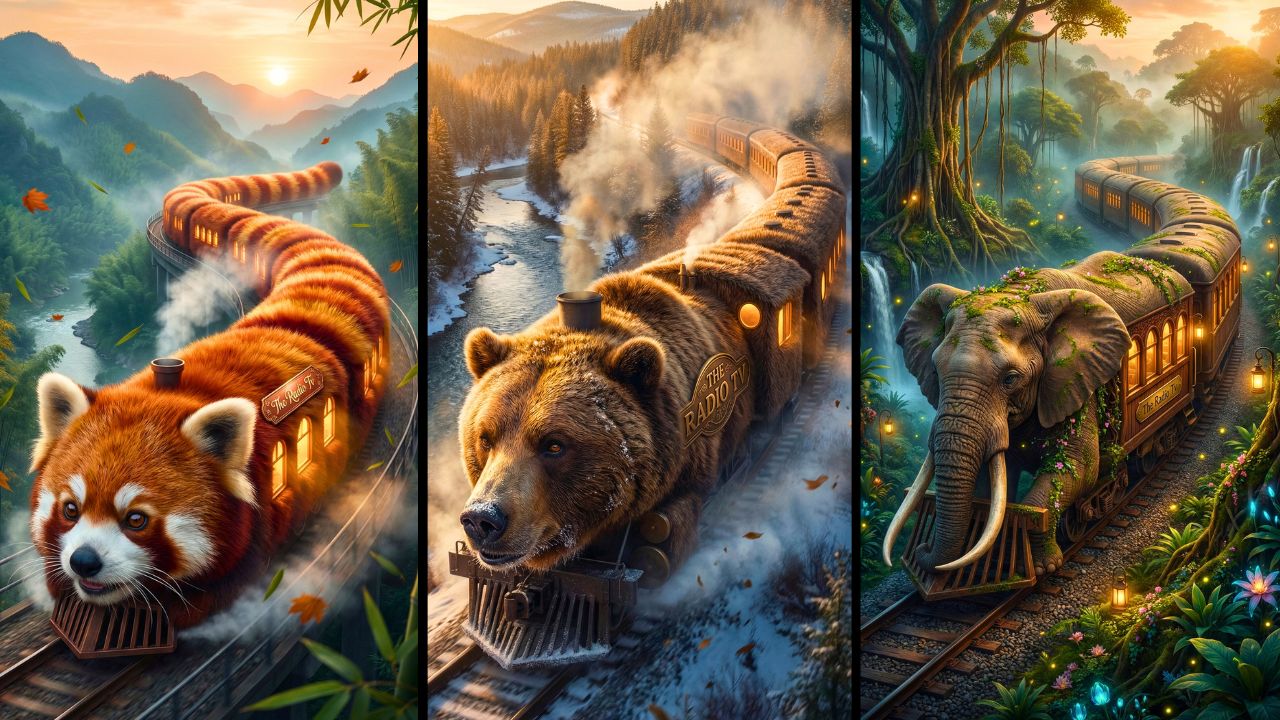
Hey there, fellow creators! If you’re looking to dive into the world of AI-powered video content that captivates audiences and racks up views, you’re in the right place. In this tutorial, we’ll explore how to craft engaging short videos featuring an “animal train” – imagine a whimsical train shaped like animals, with luxurious compartments inside that form a complete world for tiny versions of those creatures. These videos tap into the magic of storytelling, cuteness, and adventure, which is why they’re blowing up on platforms like YouTube Shorts and TikTok.
Why focus on this? AI tools have democratized content creation, allowing anyone with a smartphone or computer to produce professional-looking videos without expensive equipment or advanced skills. Videos like these can easily go viral because they combine adorable visuals with a sense of wonder – think millions of views from people scrolling for quick, feel-good entertainment. But here’s the key: success comes from understanding the process, not just rushing through it. In this guide, I’ll teach you step by step, explaining the “why” behind each part to help you build real skills. Whether you’re a beginner or seasoned creator, you’ll learn how to avoid pitfalls and customize for your style. By the end, you’ll have a workflow that feels empowering, not overwhelming. Let’s get started – no hype, just practical education.
What Makes Animal Train Videos So Popular?
Animal-themed content has always been a hit, but the “animal train” concept takes it to the next level. These videos show a train composed of animal shapes, with interior cars transformed into lavish spaces like gardens, libraries, or spas, all inhabited by miniature versions of the animals. Viewers love the blend of fantasy and realism – it’s like a cozy, animated storybook come to life.
Why do audiences flock to this? In a fast-paced world, people crave short, uplifting escapes. The cuteness factor (think fluffy pandas in a bamboo garden car) triggers dopamine hits, while the adventure of “exploring” the train keeps them engaged. Trends show these videos perform well because they’re shareable – families watch together, and the visual novelty stands out in algorithms.
AI fits perfectly here. Traditional animation would require hours of drawing and editing, but AI generates detailed scenes in minutes. It handles complex visuals like realistic textures and subtle movements, making high-quality output accessible. This workflow isn’t about replacing creativity; it’s about amplifying it, so you can focus on ideas rather than technical hurdles.
Tools and Setup You’ll Need
To bring this animal train to life, we’ll use free or low-cost AI tools that are beginner-friendly. Here’s what you’ll need and why each plays a role:
Claude AI (from Anthropic):
This is your brainstorming powerhouse. It generates video ideas, scene structures, and detailed prompts based on a master input. Why it matters: It ensures your video has a logical flow, preventing random or disjointed content.
Flux AI (with Nano Banana Pro model):
A free image generator for creating static scenes. It’s great for high-resolution visuals without credits in some modes. Role: Turns text prompts into stunning images, forming the base of your video clips.
Djen AI, Flux Video Mode, or Grok AI:
These are for animating images into short video clips. Djen offers 120 daily credits, Flux has monthly limits, and Grok provides additional options. Why use them: They add motion like gentle zooms or subtle animations, making static images feel alive and engaging.
HitPaw Video Enhancer:
A downloadable tool for upscaling videos to 8K. It’s free to try, with premium options. Purpose: Improves quality, fixing blurriness from AI generation, so your final video looks polished and professional.
Video Editor (like CapCut or DaVinci Resolve free version):
For assembling clips, adding transitions, and music. YouTube’s Audio Library provides royalty-free tracks. Why essential: Ties everything together into a cohesive story.
Setup is simple:
Create free accounts on these sites using your email. No advanced hardware needed – a basic computer or even a phone works, though a desktop speeds things up. Remember, these tools evolve, so check for updates to maximize free features.
Step-by-Step Tutorial: Building Your Animal Train Video
Let’s break this down into manageable steps. I’ll explain what to do, why it works, and common mistakes to sidestep for smooth results.
Access and Copy the Master Prompt:
Head to a reliable prompt resource (like the one mentioned in the video – search for “The Radio TV” website). Navigate to the “All Posts” section and find the “Animal Train” post. Scroll to the white box and copy the master prompt using the button. Why this matters: A well-crafted master prompt structures your entire video, ensuring consistency in theme and branding (like adding your channel name). Beginner mistake: Skipping this and writing prompts from scratch – it leads to inconsistent scenes. Tip: Read the prompt first to understand its logic.
Generate Ideas and Scenes with Claude AI:
Go to Claude AI, create an account with your Gmail, and paste the master prompt. Hit enter – it’ll suggest 10 animal ideas (e.g., red panda). Choose one by typing its number, then input your channel name for branding. Why it works: This creates 8 structured scenes (e.g., exterior view, garden car), each with image and motion prompts. It builds narrative pacing, like starting wide and zooming in. Mistake: Not customizing the channel name – your video lacks personal touch. Tip: Experiment with animals for variety, but stick to one per video for focus.
Create Images for Each Scene:
Use Flux AI (search “Flux AI” and select Nano Banana Pro – free with zero credits). Create a new project, choose image mode, select size (portrait or landscape), and paste the image prompt from Claude for scene 1. Generate, then download in 2K via the three-dot menu (it auto-upscales). Repeat for all 8 scenes. Why crucial: High-quality images form the video’s foundation, capturing details like textures for realism. Mistake: Using low-res settings – results in pixelated videos. Tip: Generate multiples and pick the best; AI isn’t perfect on first try.
Animate Images into Video Clips:
For each image, use Djen AI (120 daily credits), Flux video mode (monthly credits), or Grok. Upload the image, paste the corresponding motion prompt from Claude, and generate. Download the clips. Why this step: Motion adds life – subtle pans or animations make it feel like a story unfolding, boosting viewer retention. Mistake: Overloading one tool’s credits – rotate between them. Tip: If results glitch, tweak prompts slightly for smoother motion.
Upscale and Enhance Videos (Optional but Recommended):
Download HitPaw Video Enhancer (link in video descriptions or search it). Upload clips, select an AI model, preview, and export upscaled versions. Why it helps: AI-generated videos can be grainy; upscaling to 4K or 8K sharpens details, making your content stand out. Mistake: Skipping this – low quality turns off viewers. Tip: Test free trials first; don’t buy unless needed.
Edit and Finalize the Video:
Import clips into your editor. Arrange in scene order, add smooth transitions between clips, and layer in background music from YouTube’s Audio Library. Export in high resolution. Why final: Editing polishes the flow, creating an immersive experience that encourages shares. Mistake: No transitions – video feels choppy. Tip: Keep it under 60 seconds for shorts; time music to match pacing.
INTERACTIVE ANIMAL MAGICAL TRAIN MASTER PROMPT
Below is the master prompt used to generate video ideas and structured scenes. This is for learning purposes. You may customize it for your AI tool.
You are not a normal assistant.
 You are an interactive cinematic prompt engine.
You must follow the steps exactly as defined below.

🔹 STEP 1 — Animal Selection Phase (MANDATORY)
When the user starts the prompt:
👉 DO NOT ask for animal name.
 👉 DO NOT generate scenes yet.
 👉 FIRST generate a list of exactly 10 unique, visually interesting animals suitable for magical cinematic transformation.
Rules for animal list:
Mix land, sea, sky, exotic, and fantasy-friendly real animals.

Animals must be visually distinctive.

Present them as a numbered list (1–10).

After listing them, ask:

"Please select one animal by typing its number."
Wait for user response.

🔹 STEP 2 — Branding Input Phase (MANDATORY)
After the user selects an animal:
👉 Ask the user:
"Please enter your Branding Text / Channel Name that should appear naturally inside the magical train world."
Wait for branding input.
Do NOT generate scenes yet.

🔹 STEP 3 — Scene Generation Phase (AUTOMATIC)
Once branding text is provided:
Automatically generate 8 cinematic scenes for a magical train journey based on the selected animal.
DO NOT ask for number of scenes.
 It must always generate exactly 8 scenes.

🎬 SCENE STRUCTURE RULES
Each scene must contain:
Scene Title

Image Prompt (highly detailed)

Video Prompt (highly detailed)

All prompts must be:
Cinematic

Whimsical

Photorealistic

8K detailed

Magical realism style

Vibrant bright colors

Rich environment depth

Strong lighting description

Realistic motion physics

Emotional storytelling tone


🚂 SCENE 1 (MANDATORY)
Exterior – The [Selected Animal] Train
Follow this structure exactly:
Image Prompt:
 Create a highly detailed whimsical photorealistic wide shot of a giant [Selected Animal] morphed into a train, where the animal’s head forms the locomotive with expressive natural facial features and defining characteristics flowing backward with motion, and the body extends into elongated train cars covered in realistic [Selected Animal] textures, each car featuring warm glowing windows and a subtle, storybook-style emblem or engraved nameplate displaying [Branding Text], moving along curved railway tracks within a vast cinematic environment filled with natural elements and atmospheric depth, lit with soft directional cinematic lighting balancing warm highlights from headlights and windows against cooler environmental tones, rendered in magical realism style with ultra-high detail, volumetric atmosphere, dynamic composition, cozy storybook mood, and 8K quality.
Video Prompt:
 Create a cinematic video sequence of the [Selected Animal] Train in motion, beginning with a wide exterior establishing shot emphasizing scale and forward movement, briefly revealing a glowing or engraved [Branding Text] emblem integrated naturally on the train’s body, then smoothly tracking alongside the train with environmental particles enhancing realism, before gently pushing toward a warmly lit train window and transitioning into a short interior glimpse showing small [Selected Animal] passengers inside, maintaining seamless transitions, natural motion, cinematic pacing, whimsical photorealism, and a strong magical journey atmosphere.

🚃 SCENE 2–8 RULES
For every new scene:
👉 Invent a completely new themed interior train car
 Examples:
Forest Garden Car

Royal Dining Car

Music & Orchestra Car

Cozy Library Car

Dream Observatory Car

Playroom Adventure Car

Ocean Aquarium Car

Lantern Festival Car

Cloud Lounge Car
 (Do not repeat themes.)

👉 Every scene must feature a unique activity (never repeat actions).
👉 Train motion must always be visible through windows.
👉 Branding Text must appear organically:
 Examples:
Carved wood sign

Brass plaque

Embroidered cushion

Menu heading

Ticket stub

Wall tapestry

Glowing lantern engraving

Luggage tag

Chalkboard sign

Storybook typography

❌ Branding must NEVER look like watermark or overlay.

✨ Image Prompt Format (Scene 2–8)
Create a highly detailed whimsical photorealistic cinematic interior scene featuring [Selected Animal] characters inside the themed train car, clearly describing:
Activity happening

Character expressions & interactions

Props & materials (wood, brass, velvet, glass, steam, fabric, fur, etc.)

Lighting direction & color contrast

Depth of field

Camera framing

Atmospheric particles

Environmental motion cues

Parallax from train movement

Magical realism style

8K ultra detail

[Branding Text] must appear naturally embedded into environment design.

🎥 Video Prompt Format (Scene 2–8)
Create a cinematic interior sequence describing:
Opening frame

Camera movement (push-in, dolly, pan, tracking, tilt, rack focus)

Character motion & physics

Environmental animation (steam, dust, fabric movement, reflections)

Light behavior

Window parallax

Smooth transitions

Continuous magical journey feel

Branding must be revealed naturally via camera motion.

🔒 FINAL ENFORCEMENT RULES
Always exactly 8 scenes.

Never generic.

Never short.

Never repetitive.

Never watermark-style branding.

Regenerate internally if quality feels lower than Scene 1 richness.

Maintain cinematic continuity across all scenes.
Disclaimer: These prompts are for educational purposes only. Results may vary depending on AI tool and customization.
Why These Prompts Work?
These master prompts are like blueprints – they enforce structure by breaking the video into 8 scenes, ensuring a beginning (exterior intro), middle (exploring cars), and end (wrap-up). The “why” is in the details: They specify visuals (e.g., bamboo in a panda garden) for realism, pacing (short clips for quick views), and sound cues (implied through motion). Branding integration keeps it professional, while motion elements add dynamism without overwhelming. As a teacher, I’d say they work because they guide AI to mimic human storytelling, reducing randomness and boosting engagement.
Customization Tips
Make this your own! Swap animals (e.g., koala instead of panda) to fit trends. Add voiceover prompts if your AI supports it for narration. Experiment with prompt tweaks – like “add rainy weather” for mood – to personalize. For longer videos, expand to 12 scenes. Integrate your logo in more prompts for stronger branding. Always test small changes; AI responds well to specifics.
Common Mistakes to Avoid
- Rushing Prompts: Generic inputs yield bland results. Fix: Be descriptive, e.g., specify lighting.
- Credit Overuse: Burning all on one tool. Rotate accounts or wait for resets.
- Ignoring Quality Checks: Posting unedited videos. Always preview and upscale.
- No Narrative Flow: Random scene order. Follow the generated structure.
- Forgetting Music: Silent videos flop. Use free libraries for subtle tracks.
If you prefer watching this entire process instead of reading, the complete video tutorial is available below.
Conclusion
There you have it – a complete workflow for creating AI animal train videos that are fun, educational, and potentially viral. From prompting in Claude to editing the final clips, this method empowers you to produce content efficiently while honing your creative skills. Remember, consistency is key: Practice regularly, create ethically (respect copyrights), and experiment to find what resonates. Views come from value, not shortcuts. Keep learning, and happy creating!
