
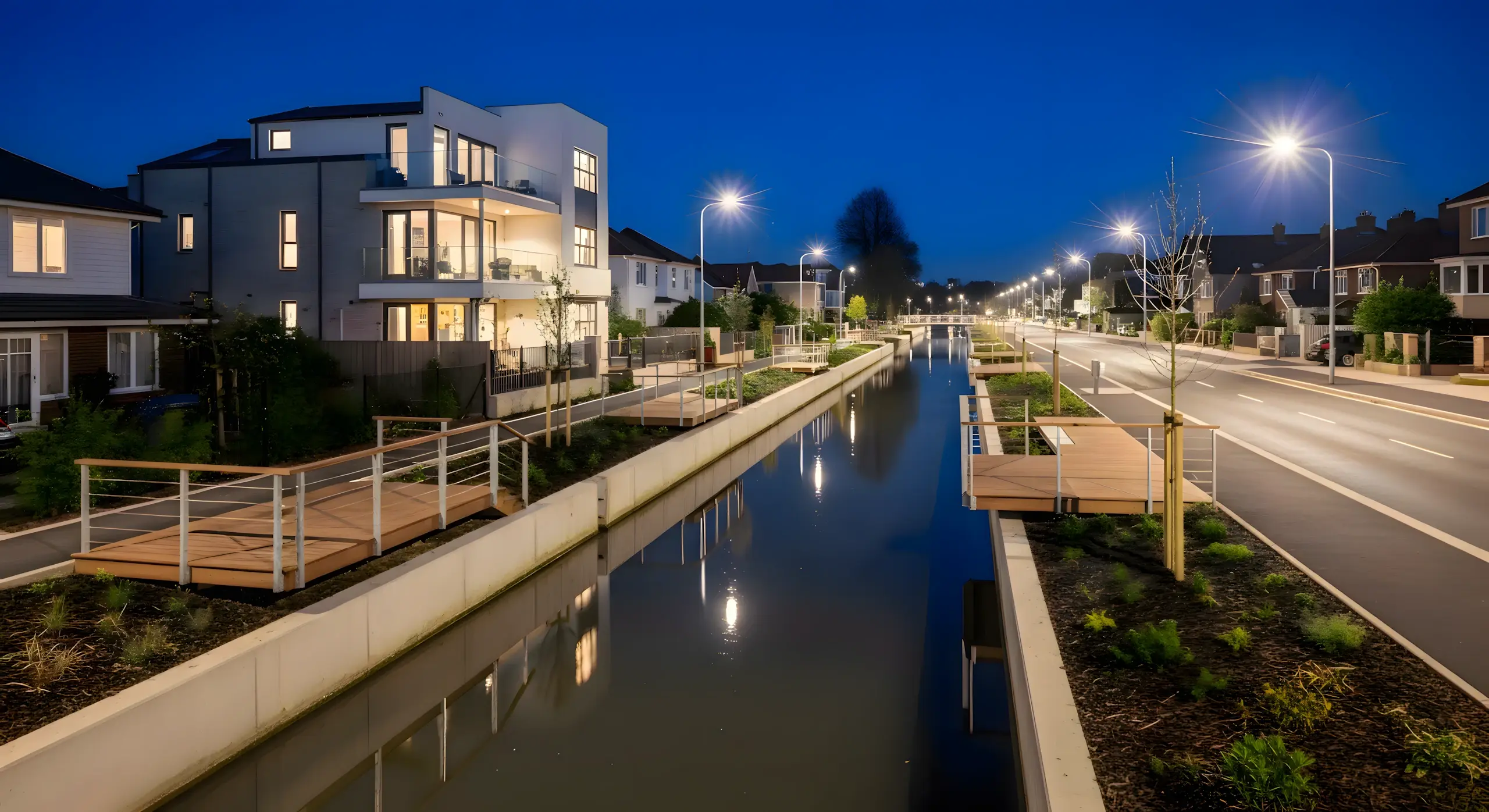
How To Create Viral Before & After Transformation Videos With Ai 🚀🔥
Introduction
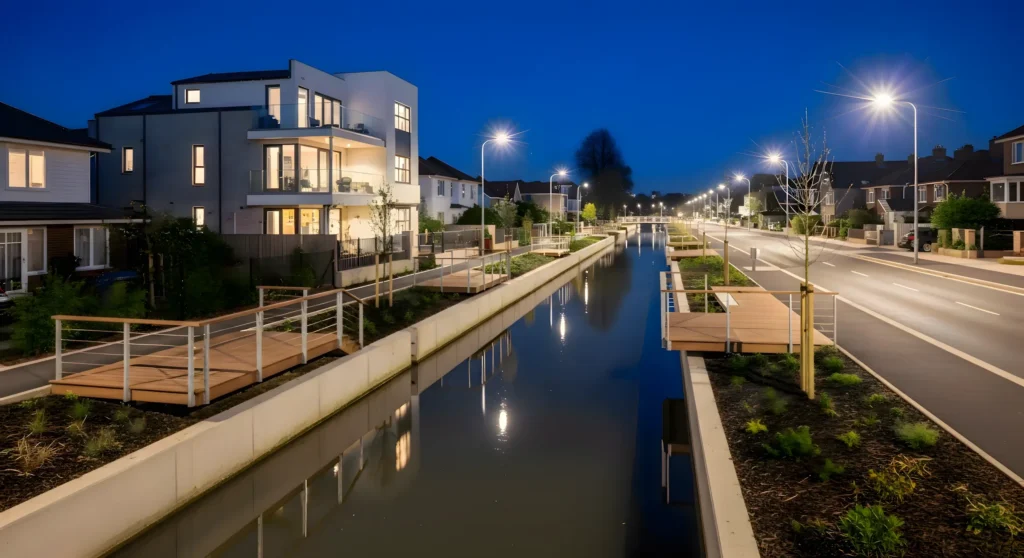
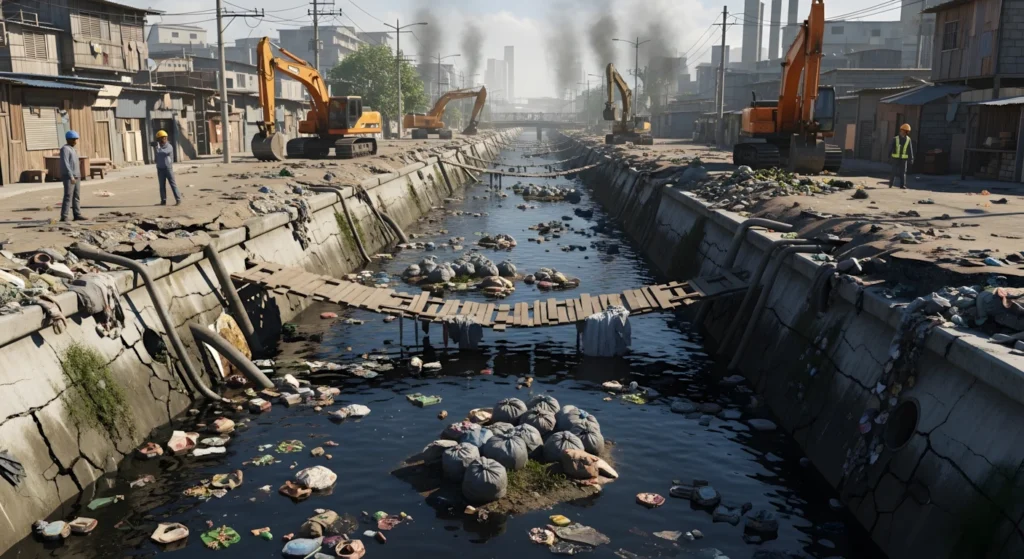
AI-powered “before–after” transformation videos have quietly become one of the most engaging formats on Facebook and Instagram. You’ve probably seen them: a polluted canal, a messy street, or a broken building slowly transforming into something clean, modern, and almost cinematic. These videos work so well because they combine three things our brains love—visual contrast, smooth motion, and a satisfying story of improvement. When done right, a single clip can gather millions of views without a large team, expensive cameras, or paid software.
This tutorial is valuable because it demystifies that process. Instead of saying “use AI and go viral,” we break the workflow into clear, human steps that you can follow from your phone. You’ll learn how to generate structured ideas, turn them into detailed image prompts, create consistent visuals, and then convert still images into seamless video clips using mostly free tools. The goal isn’t hype or quick money—it’s to help you understand why each step matters so you can replicate, customize, and eventually develop your own style of AI transformation videos in a reliable, repeatable way.
The Trend / Concept Explained
These transformation videos are popular because they tap into a simple but powerful emotion: progress. Viewers feel a sense of relief and satisfaction when they see something dirty become clean or something broken become beautiful. It’s almost therapeutic to watch. On social media, this type of visual payoff performs well because it grabs attention in the first three seconds and keeps it through smooth transitions.
AI is especially suitable for this workflow because you can create multiple versions of the same location—messy, partially cleaned, and fully transformed—without physically visiting the place. AI image tools let you keep the same “core scene” while gradually improving details, and motion tools can blend those images into natural-looking video. Instead of filming for hours or hiring a drone, you’re guiding the story through prompts and smart tool choices.
Tools & Setup
Here are the main tools used in this workflow and why they matter:
- ChatGPT – Used to generate structured video ideas and convert those ideas into detailed image and motion prompts. It acts like your creative planner.
- Wisk (AI image generator) – Helps you create your first set of images quickly and for free in a 9:16 format suitable for short videos.
- Google Gemini (Image creation) – Used for more polished, professional-looking images by refining your initial visuals.
- Flow (Frame-to-Video tool) – Converts your images into smooth video clips with natural transitions and motion.
- Any mobile video editor – For assembling your final clips, adding background music, and exporting the finished video.
Each tool plays a specific role: ideas → images → refinement → motion → final editing.
Step-by-Step Tutorial
Step 1: Generate Your Location Ideas (With Structure)
Start by using a master idea-generation prompt in ChatGPT. This prompt produces around 10 short location concepts (4–5 lines each), such as a trash-filled canal, a neglected park, or a rundown street.
Why this matters:
Having structured ideas prevents random creation. You’re choosing from clear starting points instead of guessing what to make.
Beginner mistake:
Typing vague requests like “give me a video idea.” Always use a structured prompt so your output is consistent.
Step 2: Turn One Idea into Detailed Prompts
Pick one idea you like and feed it into a second master prompt in ChatGPT. This converts your concept into six highly detailed prompts: three for images and three for motion (video transitions).
Why this matters:
You’re not just making pictures—you’re designing a visual sequence: dirty → partially cleaned → fully transformed.
Beginner mistake:
Skipping this step and trying to describe everything manually in an image tool. You’ll lose consistency.
Step 3: Create Your First Image (Dirty Scene)
Copy the first image prompt and paste it into Wisk. Choose 9:16 if you want a short video. Generate a few variations and pick one that best represents a “polluted or messy” version of your location.
Why this matters:
This is your baseline frame—the emotional starting point of your story.
Beginner mistake:
Over-editing or adding extra instructions inside Wisk. Stick to the prompt.
Step 4: Create the Second Image (Partially Cleaned)
Upload your selected first image as a reference, then use the second image prompt in Wisk or Gemini. This creates a scene where some cleanup has already happened.
Why this matters:
Keeping the same reference image ensures continuity, so your video doesn’t look like a completely different place.
Beginner mistake:
Generating a totally new image without using the first one as a reference.
Step 5: Create the Third Image (Fully Transformed)
Repeat the same process with the third image prompt. This should look modern, clean, and visually upgraded—sometimes even slightly futuristic.
Why this matters:
This is your “wow moment.” It completes the transformation story.
Beginner mistake:
Making it too unrealistic. Viewers prefer believable improvements over fantasy scenes.
Step 6: Convert Images to Video in Flow (Clip 1)
Upload Image 1 and Image 2 into Flow’s “Frame to Video” section. Paste the first motion prompt (for image 1 → image 2) and generate your video.
Why this matters:
Flow creates natural movement and transitions instead of a hard slideshow effect.
Step 7: Create Clip 2 (Middle to Final)
Upload Image 2 and Image 3, paste the second motion prompt, and generate your second video clip.
Step 8: Create a Cinematic Ending (Clip 3)
Upload only your final image (Image 3) and paste the third motion prompt. This usually creates a slow, cinematic, drone-like movement over your transformed scene.
Step 9: Assemble in a Video Editor
Import all three clips into any mobile editor, place them in order, add background music, and export in the highest resolution. No fancy transitions are needed—the AI motion already did the work.
IDEAS PROMPT FOR polluted condition of the location
Below is the master prompt used to generate video ideas and structured scenes. This is for learning purposes. You may customize it for your AI tool.
Act as a realistic environmental location concept generator.
Your task is to generate 10 unique location ideas inspired by extremely dirty, polluted, garbage-filled, and neglected environments.
IMPORTANT RULES:
• Each idea must be set in a different geographical environment such as mountains, hills, riverbanks, canals, coastal areas, forests, urban outskirts, industrial zones, or rural settlements.
 • Each idea must describe a heavily polluted and garbage-filled location.
 • Clearly describe visible dirt elements such as trash piles, sewage water, broken houses, muddy pathways, smoke pollution, plastic waste, contaminated water, or destroyed surroundings.
 • Focus only on describing the current dirty and polluted condition of the location.
 • Do NOT mention cleaning, improvement, beauty, transformation, or future development in any way.
OUTPUT FORMAT RULES:
• Generate exactly 10 ideas.
 • Each idea must be 4 to 6 lines long.
 • Each idea must clearly mention the type of area (mountain, hill, river, canal, etc.).
 • Use highly visual and realistic descriptive language suitable for cinematic AI image or video generation.
Disclaimer:
These prompts are for educational purposes only. Results may vary depending on AI tool, model updates, and your customization.
MASTER PROMPT For 6 highly detailed cinematic IMAGE & MOTION PROMPTS
This second master prompt converts each scene into detailed image and motion prompts for realistic AI video generation.
Act as a professional cinematic AI image and video prompt engineer specializing in environmental timelapse transformation storytelling.

Your task is to generate 6 highly detailed cinematic prompts based on the location description provided below.

LOCATION DESCRIPTION:
[PASTE LOCATION IDEA HERE]

IMPORTANT RULES:

Location description must appear naturally in all prompts.

Maintain strong visual consistency across all stages.

Environment, terrain, and geographical features must remain the same in every stage.

Prompts must feel hyper-realistic, cinematic, and suitable for AI image and video generation.

Camera angles for photos and video must remain straight + slightly elevated.

Clearly separate Photo prompts and Video prompts.

Video transitions must be continuous timelapse, no abrupt cuts.

Each timelapse video should last 8 seconds.

PHOTO PROMPTS

PHOTO 1 — INITIAL STAGE (DAY, SLUM)

hyper-realistic, cinematic, natural, photoreal
Camera angle: straight + slightly elevated

A wide cinematic shot of the location in its worst polluted and underdeveloped condition using the provided location description.

Must include:

Severely damaged roads or terrain matching the location

Heavy garbage, pollution, or environmental destruction

Poor or broken housing structures

Dirty or contaminated water bodies if applicable

Disorganized surroundings and scattered debris

Active construction workers wearing safety gear in foreground

Visible heavy construction machines such as excavator or bulldozer

Harsh midday lighting with sharp shadows
Mood: neglected, chaotic, underdeveloped

PHOTO 2 — MIDDLE STAGE (GOLDEN HOUR)

hyper-realistic, cinematic, natural, photoreal
Camera angle: straight + slightly elevated

Same location during active development and transition phase.

Must include:

Environment partially organized but completely clean, no garbage no dirt

Debris partially removed

Road or terrain partially repaired

Workers actively building or moving materials

Construction machinery still visible

Golden hour sunset lighting with warm tones and long shadows

Slight construction dust in the air
Mood: transitional, hopeful, busy progress

PHOTO 3 — FINAL STAGE (NIGHT, MODERN)

hyper-realistic, cinematic, natural, photoreal
Camera angle: straight + slightly elevated

Same location fully modernized, organized, and clean.

Must include:

Fully developed infrastructure

Completed modern roads

Functional LED streetlights illuminating the area, vibrant colors hon, night scene glowing cozy homes, modren street lights

Clean water bodies if applicable

Renovated or modern houses arranged neatly

One prominent modern 2-story house with balcony as focal point

Calm cinematic night environment with deep blue sky

NO workers

NO construction machinery

VIDEO PROMPTS (TIMELAPSE, 8 SECONDS EACH)

VIDEO 1 — TIMELAPSE (PHOTO 1 → PHOTO 2)

Professional cinematic drone, hyper-realistic timelapse
Duration: 8 seconds
Camera: straight + slightly elevated, completely still

SCENE MOTION:

Continuous timelapse from Photo 1 to Photo 2

Workers move quickly, machinery operates at accelerated speed

Garbage piles shrink and disappear gradually, frame-by-frame

Roads and terrain visibly rebuild step by step

Dust, smoke, and environmental particles animate naturally during timelapse

Lighting transitions smoothly from harsh midday sun to golden hour

Entire scene transforms in the same frame, no cut

VIDEO 2 — TIMELAPSE (PHOTO 2 → PHOTO 3)

Professional cinematic drone, hyper-realistic timelapse
Duration: 8 seconds
Camera: straight + slightly elevated, completely still

SCENE MOTION:

Continuous timelapse from Photo 2 to Photo 3

Buildings, roads, and infrastructure appear gradually, frame-by-frame

Workers and machinery fade and disappear naturally

Garbage completely removed in incremental frames

Streetlights gradually turn on, water becomes reflective and clean

Lighting transitions smoothly from golden hour to night environment

Entire scene remains in the same frame, smooth progression

VIDEO 3 — DRONE ORBIT FINAL SCENE

Professional cinematic drone, slow smooth orbit

SCENE MOTION:

Slow cinematic orbit around the final modern location

Focus on prominent modern 2-story house with balcony

Reveal clean infrastructure and glowing lights from different angles

Subtle environmental micro-movements: water reflections, gentle breeze

Mood: calm, aesthetic, cinematic

Movement: smooth, continuous, professional
Disclaimer:
These prompts are for educational purposes only. Results may vary depending on AI tool, model updates, and your customization.
Why These Prompts Work
These master prompts work because they enforce structure. Instead of random images, you get a clear visual arc: problem → partial solution → final result. The image prompts focus on consistent lighting, location continuity, and progressive change, while the motion prompts describe camera movement, pacing, and transition style. Together, they create a professional feel without professional equipment.
Customization Tips
- Try different environments: rivers, streets, rooftops, beaches, or abandoned buildings.
- Adjust the “level of transformation”—sometimes subtle changes feel more realistic than extreme ones.
- Experiment with time of day: morning → afternoon → golden hour can look very cinematic.
- Use Gemini for your most important frames if you want higher detail.
Common Mistakes to Avoid
- Inconsistent visuals: Always use your first image as a reference for the next ones.
- Too much text on screen: Let visuals do the storytelling.
- Skipping motion prompts: Your video will look choppy without them.
- Overly unrealistic results: Keep transformations believable.
- Using random music: Pick something calm and cinematic to match the mood.
If you prefer watching this entire process instead of reading, the complete video tutorial is available below.
Conclusion
Creating viral-style AI transformation videos isn’t about luck—it’s about a repeatable workflow: structured ideas, consistent images, smart motion prompts, and clean editing. Start with one location, master this process, and then scale to multiple scenes. Stay consistent, experiment responsibly, and focus on storytelling rather than shortcuts. With practice, your videos will naturally become better, more polished, and more engaging over time.


Prompt
sir asa uplode kir na ka li youtub chanl kisa bani is par ak video bani da plz request ha ap sa
Bhai Jaan Aik Lambe Time se me app ki Videos ko Dekh raha hun or like bhi kar raha hun.Agar app ye Parh rahe hean to Aik request he ke jab jab app apna naya Idea ke propmts dale to us ke Sath Channel ka naam bhi Bataya Karien take Log Dekh Paye ke ye wo log hean jo is type ki Videos bana Rahe hean is se hamari madad hogi or app apni Videos me bhi Channel name nahi Dikhate so Please
bhai youtube ki policy ke khilaf hay ke me kisi ke channel ka name dikha ke us ki earning ka jayeza laga ke dikhaun, is liay ap ka bhai majbur hay.
sir please sir sirf aik bar aur editz videos bana sikha di jiye please sir like dexod editz ya nabi editz jaise content bohat viral ho rahe hein please sir please bhai mein sindh ka rehne wala hun sanghar shehar please bhai yeh bohat he viral idea hai me kamm karna chahta hun
sir asa uplode kir na ka li youtub chanl kisa bani is par ak video bani da plz request ha ap sa
sir please sir sirf aik bar aur editz videos bana sikha di jiye please sir like dexod editz ya nabi editz jaise content bohat viral ho rahe hein please sir
mein pakistan , sindh me he rehta hun sanghar city me
please sikha den bohat he viral idea hai … please ramzan bhai
sir pakistani content pai b otne he earning hote hai jitne ki uk ya usa content pai hote hai ?
sir aura editz wahan galat ho gaya aura editz troll face editz
sir aura editz aura editz troll face editz wala content please sir me ap ka bohat purana viewer hun ap ne mujhay bohat kuch sikhaya hai aj aik madad chahiye sir please agli video issi par he banaye ga
Nice
When did this topic start becoming relevant as explained in How To Create Viral Before & After Transformation Videos With Ai?
bhai reply please
sir mera name yasirmughal h sir please ek chota sa reply chaiyee please editting problam hoti h mujhy bs please ap edit py ek video banao yasirmughal12113
shukriya Sami saab
Aapka maddah
https://www.facebook.com/reel/1628031505218720?sfnsn=scwspwa&mibextid=6AJuK9 Ramzan Bhai is type ki video ka prompt bhi bna den thanks