
How To Create Jungle & Forest Chase Ai Videos (Normal Selfie Style)
Introduction
Short-form AI videos are exploding across YouTube Shorts, TikTok, and Facebook Reels because they combine three powerful elements: instant visual drama, emotional tension, and novelty. When a viewer sees a person casually filming a selfie while a wild animal suddenly appears behind them, the brain reacts immediately — “What’s going to happen next?” That split-second curiosity is what stops scrolling and drives engagement.
This tutorial is valuable because it doesn’t rely on luck, expensive cameras, or complicated software. Instead, it teaches a clear, repeatable workflow that anyone can follow using only a mobile phone and AI tools. You’ll learn how to generate the right images, upscale them properly, turn them into realistic motion videos, and add sound design so the final clip feels alive rather than artificial.
Unlike many “make money fast” videos, this guide focuses on skills: prompt writing, visual storytelling, and basic post-production. Even if algorithms change in the future, these principles will still help you create compelling AI content. By the end, you’ll understand not just what to click, but why each step matters for virality and viewer retention.
Trend / Concept Explanation
This “selfie with a wild animal behind you” style works because it plays on a universal human emotion: survival instinct. Audiences are naturally drawn to danger scenarios — especially when they look real but are actually safe, AI-generated fiction. The concept mixes relatability (a person filming themselves) with shock value (a tiger, bear, or crocodile appearing unexpectedly).
Viewers also enjoy these videos because they feel like a mini movie in 5–8 seconds. There’s a setup (the person filming), a twist (the animal appears), and a payoff (movement or chase). Even without dialogue, the story is instantly understandable.
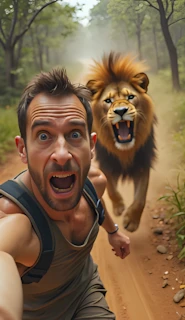
AI is particularly suitable for this workflow because real-life filming of wild animals would be dangerous, expensive, and unethical. AI allows creators to experiment with different animals, environments, and camera angles safely and creatively. Additionally, AI tools let beginners achieve professional-looking results without needing advanced editing or animation skills.
Tools & Setup
Here are the main tools referenced in the tutorial and their roles in the workflow:
- ChatGPT (chat.com or dpsk.com) – Used to expand and generate additional image prompts based on a few sample prompts. This saves time and improves variety.
- Image Generators (crAI / Learno AI / similar tools) – Used to create the base images of a person filming a selfie with a wild animal behind them. These images are the foundation of your video.
- Pixelcut AI (Image Upscaler) – Used to increase image resolution. Higher-quality images lead to smoother, more realistic AI video motion.
- Video Generators (Kling AI / Hello AI) – Convert still images into moving videos using motion prompts.
- Pixabay (pigzabb.com in the transcript) – Source of free sound effects (animal roars, footsteps, ambient sounds).
- YouTube Audio Library – Used to add background music that matches the tension and mood of your clip.
Each tool plays a specific role: prompts create ideas, image tools create visuals, upscaling improves quality, video tools add motion, and sound design brings everything to life.
Step-by-Step Tutorial
Step 1 — Collect or Generate Your Base Prompts (Why it matters)
Start by selecting 2–3 sample image prompts for different animals (tiger, bear, crocodile, etc.). These act as your “seed ideas.”
Why this matters: Good prompts determine whether your final image looks realistic or awkward. Clear structure in your prompt leads to better AI results.
Beginner mistake: Trying to write long, complicated prompts from scratch without examples.
Step 2 — Expand Prompts Using ChatGPT
Paste your 2–3 sample prompts into ChatGPT and ask it to write “10 similar image prompts.” You can do this in Urdu or English.
Why this matters: This gives you variety so all your videos don’t look the same.
Beginner mistake: Using only one prompt repeatedly, which makes content feel repetitive.
Step 3 — Generate Images in an AI Image Tool
Go to an image generator (like crAI or Learno AI).
- Paste your chosen prompt
- Select aspect ratio 9:16
- Choose medium quality
- Generate 3–4 images
Why this matters: Vertical 9:16 is ideal for Shorts/Reels.
Beginner mistake: Using square or horizontal images that don’t fit short-video platforms.
Step 4 — Download and Upscale Your Images
Upload your images to Pixelcut AI and use the Image Upscaler to increase resolution.
Why this matters: Video AI tools perform much better with high-resolution images.
Beginner mistake: Skipping upscaling and ending up with blurry videos.
Step 5 — Convert Images to Video (Motion)
Upload your upscaled image to Kling AI or Hello AI and paste your motion prompt (from your master prompt set). Then generate a short video (around 5–8 seconds).
Why this matters: Motion makes the scene feel alive — the animal moves, the camera shakes, or the person appears tense.
Beginner mistake: Expecting perfect Hollywood-level motion from the first attempt.
Step 6 — Add Sound Effects
Download animal sounds (roars, growls) and running footsteps from Pixabay. Add them to your video in any mobile editor (CapCut, VN, InShot, etc.).
Why this matters: Sound is 50% of the emotional impact. Without it, videos feel flat.
Beginner mistake: Using random background music without matching it to the scene.
📸 Jungle & Forest Chase Prompts (Normal Selfie Style)
Below is the master prompt used to generate video ideas and structured scenes. This is for learning purposes. You may customize it for your AI tool.
1️⃣ Tiger Chase Selfie
A high-intensity selfie photograph of a young man sprinting down a dusty jungle path, face frozen in terror with wide eyes and open mouth. Behind him, a huge Bengal tiger charges at full speed, mouth open and claws out, kicking up a storm of dust. Tall trees blur past in daylight, creating dramatic tension. The photo is tightly framed on the man’s face and shoulders, with the tiger fully visible in the background. Camera or hand is not visible, just like a normal selfie. Vertical 9:16, cinematic action.

2️⃣ Leopard Attack Selfie
A digital selfie captures a horrified young man running, his hair flying and eyes wide with fear. In the background, a massive leopard sprints toward him, muscles flexed and eyes locked, its paws tearing through the dusty forest trail. Natural daylight, vertical 9:16, detailed jungle scenery. Camera or hand not visible.

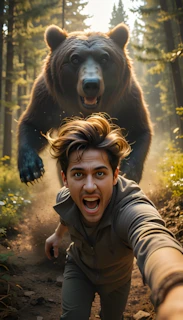
3️⃣ Grizzly Bear Selfie
A selfie shot of a man mid-run, breathless with panic, his mouth agape and sweat on his forehead. Behind him, a gigantic grizzly bear barrels down the path, roaring, its paws slamming the ground. Dust and trees blur in motion under bright daylight. Tight focus on face and bear in background, camera/hand not visible. 9:16 format.

4️⃣ Wolf Pack Selfie
A tense selfie shows a man in pure terror as he runs, face filling most of the frame. In the background, a large alpha wolf leads a pack, all in full sprint, snarling and closing in fast. The dusty path and green trees flash by in the bright jungle daylight. Camera and hand out of frame, vertical 9:16, cinematic.

5️⃣ Wild Boar Selfie
A digital selfie of a young man running for his life, face distorted with fear. Behind him, a huge wild boar with sharp tusks charges aggressively, sending dirt flying. The forest trail and tall trees blur in motion, bright daylight highlights the dust cloud. Camera or hand invisible, vertical 9:16, action-packed.

🏞️ Savanna & Exotic Animal Chase Prompts

6️⃣ Rhino Charge Selfie
A dramatic selfie captures a man’s terrified face mid-run, hair pushed back by wind. In the background, a massive rhinoceros charges with its horn forward, throwing up a huge dust cloud. Sparse trees and savanna grasslands stretch out in bright sunlight. No camera or hand visible, vertical 9:16, dynamic motion.

7️⃣ Gorilla Rampage Selfie
A selfie photograph of a panicked young man sprinting, face red and eyes bulging with fear. A huge silverback gorilla is in full charge behind him, fists pounding the dirt, chest heaving in rage. Jungle vines and greenery streak past in daylight. Camera or hand not visible, vertical 9:16, sharp detail.

8️⃣ Lion Chase Selfie
A terrified man snaps a selfie while running, his shocked face filling the frame. Behind him, a giant male lion with a flowing mane sprints in attack mode, roaring loudly. Dust swirls around the trail, and trees blur in the daylight jungle setting. Camera and hand out of frame, vertical 9:16, cinematic lighting.

9️⃣ Hyena Pack Selfie
A digital selfie of a man fleeing for his life, face pale with panic. A large, muscular hyena chases from behind, its mouth wide and eyes wild, kicking up debris. The jungle backdrop and bright daylight set the scene. Camera or hand not visible, vertical 9:16, realistic motion blur.

🔟 Elephant Rage Selfie
A dramatic selfie of a man mid-run, sweating and gasping, with his face tightly framed. In the background, a massive wild elephant with huge tusks charges at full speed, raising dust clouds and flaring its ears. Trees flash by under natural daylight. Camera and hand not visible, vertical 9:16, cinematic action.

🐾 Reptile & Insect Chase Prompts

1️⃣1️⃣ Komodo Dragon Selfie
A selfie of a man running for his life, face wild with panic and mouth open. In the background, a giant Komodo dragon charges, mouth wide, claws digging into the dirt. Sparse trees and dry leaves blur in the jungle daylight. Camera/hand not visible, 9:16 vertical, intense detail.

1️⃣2️⃣ Python Strike Selfie
A selfie shows a horrified man mid-run, face contorted in fear. Behind him, a massive python slithers fast across the jungle path, mouth agape as it lunges. Vines and dust swirl in the sunlight. Camera or hand not visible, vertical 9:16, cinematic realism.

1️⃣3️⃣ Hornet Swarm Selfie
A digital selfie of a man screaming in terror, eyes wide and hair blown back. Behind him, a massive swarm of giant hornets fills the background, wings buzzing furiously as they close in. Jungle greenery and blue sky are slightly blurred by motion. Camera or hand out of frame, daylight, 9:16 format.

🌿 Rare Animal Chase Prompts

1️⃣4️⃣ Cassowary Attack Selfie
A selfie captures a man’s face twisted in fear while running, hair disheveled. In the background, a large cassowary with sharp claws and colorful helmet-like head sprints aggressively down the jungle path. Tall plants and daylight add realism. No camera or hand visible, vertical 9:16, cinematic motion.

1️⃣5️⃣ Moose Rampage Selfie

A selfie photo of a man running in terror, face dripping with sweat. Behind him, a giant moose with wide antlers gallops down the forest trail, nostrils flaring and hooves pounding. Pine trees blur in natural daylight. Camera or hand not visible, vertical 9:16, dramatic chase effect encounter.
Disclaimer:
These prompts are for educational purposes only. Results may vary depending on AI tool and customization.
Motion Prompt
A terrified man making video from front cam and running fast on a dusty jungle path with a huge wild animal angrily chasing behind him.
Disclaimer:
These prompts are for educational purposes only. Results may vary depending on AI tool and customization.
Why These Prompts Work
These master prompts work because they enforce structure rather than randomness. They define:
- Scene composition (selfie camera, background environment, animal position)
- Visual clarity (lighting, realism, perspective)
- Motion direction (animal movement, camera shake, depth)
- Pacing (short, dramatic clips rather than long, slow ones)
Instead of letting AI “guess,” the prompts guide it step by step, which leads to more consistent and professional-looking results.
Customization Tips
- Try different environments: jungle, savannah, snowy mountains, or urban streets.
- Experiment with different animals: lions, hyenas, gorillas, snakes, or crocodiles.
- Change the person’s outfit, camera angle, or time of day (sunset vs daylight).
- Add subtle camera effects like slight zoom or shake for realism.
- Test different background music to match tension or humor.
Common Mistakes to Avoid
Copying others blindly – Use this method, but develop your own style.
Using low-resolution images – Always upscale first.
Overloading prompts – Too many details confuse AI. Keep them structured.
Ignoring sound design – Silent videos rarely perform well.
Making clips too long – Keep them under 10 seconds.
If you’d rather watch this entire process in video form instead of reading the article, the video is available below.
Conclusion
By following these steps, you’re equipped to create one-of-a-kind AI videos that could explode in popularity, drawing millions of views and opening doors to serious income through ads, sponsorships, and more. This is a brand-new concept, so start today and you might just become the next big thing. Remember, consistency is key—keep experimenting with different animals and prompts. If you found this helpful, share it with friends and check out more tutorials on my channel for endless AI content ideas!



The Burning Building Rescue
It was a quiet afternoon when suddenly a tall building caught fire. Inside, a newborn baby lay trapped, crying loudly as smoke filled the air. The brave heroic chick, with fluffy yellow feathers and tiny wings, heard the cries and rushed toward the flames. Without a second thought, the chick darted inside, dodging falling beams and thick smoke. Using its tiny wings, it carefully lifted the baby, shielding the little one with its soft feathers. The fire roared around them, but the chick stayed focused. With a final burst of courage, the chick burst through the burning doorway, safely delivering the baby into the arms of waiting firefighters. The crowd cheered as the chick flapped its wings proudly, eyes shining with bravery. That day, the heroic chick became a true legend, proving that even the smallest heroes can save lives.