
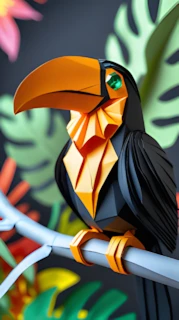
Oragami Animals Image Prompts
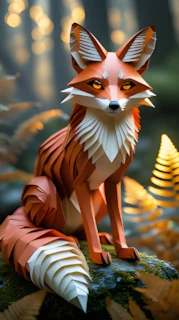
Introduction (Why This Tutorial Matters)
Short-form AI videos are quietly reshaping platforms like Instagram, TikTok, and YouTube Shorts. Millions of views no longer depend only on expensive cameras, professional animation skills, or large teams — they depend on concept, creativity, and workflow. Simple but visually striking ideas, when executed consistently, often outperform complicated productions. That is why niche, visually unique styles — like realistic paper-crafted animals moving in cinematic ways — are exploding in popularity. They feel artistic, satisfying to watch, and “shareable” within seconds.
More importantly, this workflow is educational-first. You’ll understand why each step matters — from prompt structure to aspect ratios, from upscaling to transitions. This helps you adapt, improve, and eventually develop your own style rather than blindly copying. If you follow along carefully, you’ll not just make one video — you’ll build a process you can use again and again.
The Trend / Concept Explained (Why This Works)
Paper-style animals are trending because they blend three things audiences love: realism, artistry, and motion. Visually, they look handcrafted and creative, which feels refreshing in a world saturated with generic AI imagery. Psychologically, viewers are drawn to miniature, detailed worlds — they feel delicate, magical, and immersive.
Short-form platforms also favor videos that:
- Grab attention in the first second
- Loop smoothly
- Are visually unique
- Don’t require subtitles to be understood
Paper animals fit all of these criteria. Even without dialogue, movement plus ambient sound tells a story.
AI is especially suitable here because it handles two hard tasks efficiently: generating highly detailed images from structured prompts, and converting still images into believable motion. What used to require professional 3D software can now be done in minutes from a phone — but only if you follow the right workflow.
Tools & Setup (What You Need and Why)
You will use several free or beginner-friendly tools, each with a clear purpose:
- DeepSeek (Prompt Generation)
- Role: Generates multiple structured image prompts based on your master prompt.
- Why it matters: Good prompts save hours of trial and error and ensure consistency across your videos.
- Picklumin (Image Generation)
- Role: Turns your text prompts into high-quality paper-animal images.
- Why it matters: Image quality determines video quality. A weak image = weak video.
- CapCut Image Upscaler (4K Upscaling)
- Role: Increases resolution and sharpness of your images.
- Why it matters: AI video tools perform far better with high-resolution inputs. Blurry images lead to glitchy motion.
- Runway ML (or alternatives like Kling AI / HeyGen AI)
- Role: Converts still images into realistic moving videos.
- Why it matters: This is where your static artwork becomes “alive.”
- Pixabay (Royalty-free music & sound effects)
- Role: Provides African jungle music and ambient nature sounds.
- Why it matters: Sound is 50% of the viewing experience. Silent or poorly matched audio reduces engagement drastically.
- Mobile Video Editor (Any app you prefer)
- Role: Arranges clips, adds transitions, music, and your channel name.
- Why it matters: Polished editing makes your content feel professional.
Step-by-Step Tutorial
Step 1 — Copy the Master Prompt (Foundation Stage)
Go to the creator’s blog (linked in the video description) and copy the full master prompt — including the final line.
Why this matters:
This prompt isn’t random; it’s structured to consistently produce paper-crafted animal imagery. Skipping or altering parts of it too early can break the style.
Beginner mistake to avoid:
Trying to “improve” the prompt before you even understand how it works.
Step 2 — Generate Multiple Animal Prompts with DeepSeek
Open Google, search “DeepSeek,” log in with Gmail, and paste your copied prompt into the input box. Click generate. You’ll receive 10–15 different prompts featuring various paper animals (e.g., jellyfish, owl, etc.).
If you want specific animals, type something like:
“Give me prompts for lion, parrot, cat, crow, and monkey.”
Press enter again to receive customized prompts.
Why this matters:
You’re building a mini library of ideas without doing the creative heavy lifting yourself.
Step 3 — Create Images in Picklumin (9:16 Format)
Go to picklumin.com and paste any one of your prompts.
- Keep the default model
- Select 9:16 aspect ratio
- Generate your image
Repeat this for each animal you want. Download all images to your phone.
Beginner mistake to avoid:
Using random aspect ratios. 9:16 is essential for Shorts, Reels, and TikTok.
Step 4 — Upscale to 4K Using CapCut
Search “CapCut Image Upscaler,” upload your image, select 4K, and upscale. Download the improved version.
Repeat for all images.
Why this matters:
Higher resolution = cleaner, more realistic AI motion later.
Step 5 — Convert Images to Video (Runway ML / Kling AI)
Go to runwayml.com, sign in, and upload your upscaled image.
In the prompt box, write a simple motion instruction such as:
- “Fox is moving slowly toward the camera.”
- “Owl blinks and slightly turns its head.”
Keep 9:16 selected and generate your video. Download the result.
Why this matters:
Short, clear motion prompts give more natural results than long, complicated sentences.
Step 6 — Add Music & Nature Sounds (Pixabay)
Search Pixabay for terms like:
- “African jungle music”
- “African safari ambient”
- “Tribal drums”
Download one music track and one ambient sound effect.
Why this matters:
Music creates emotion; ambient sound creates realism. Together, they make your video feel cinematic.
Step 7 — Final Editing (Transitions & Branding)
In your mobile editor:
- Import all your clips
- Slightly extend each clip
- Add smooth transitions between clips
- Place your channel name as text
- Export in the highest resolution
Prompts
1.
Close-up shot of a baby elephant made entirely from folded dark gray paper, including its trunk, ears, and body. The entire figure is crafted using the same matte material, arranged into clean, angular origami-style folds with precise layering. The large ears are wide and sharply creased, extending outward in symmetrical, wing-like shapes. The trunk is long and detailed with fine, spiral folds that give it a realistic segmented appearance. Its eyes are large, glossy black gems with subtle golden highlights, giving it a soft, intelligent expression. The background features soft, blurred jungle foliage and yellow flowers, with cinematic lighting and magical realism atmosphere. Captured with a macro lens and shallow depth of field.

2.
Close-up shot of a chameleon made entirely from folded orange paper, with crisp triangular segments forming its head, limbs, and curled tail. The material is consistent across its body-matte, slightly textured orange paper shaped into angular interlocking folds. Its large eyes are black and glittery, rounded like glass beads, catching the soft blue jungle light. The head has a geometric, polygonal build with small ridges and symmetrical folds. It rests quietly on a dark brown branch, surrounded by wet green leaves. The background is deep teal and softly blurred, with cool cinematic lighting and macro photography style that highlights the magical realism aesthetic.

3.
Close-up shot of a young gorilla figure made entirely from folded matte black paper. The entire body and face are constructed using the same material, shaped into large angular panels with sharp, precise creases. The surface has a soft, papery texture with a subtle fibrous finish, giving it a uniform and natural look. The gorilla's face is formed using interlocked geometric folds, showing a calm, wise expression with closed eyes and a slightly lowered head. The background is filled with soft green jungle leaves, captured with macro lens depth of field and natural moody lighting to create a peaceful, magical realism atmosphere.

4.
Close-up shot of a baby orangutan figure made entirely from layered dried leaves and gray-toned pressed paper. The hood, body, and limbs are wrapped in overlapping orange-brown leaf segments with torn edges and visible veining, forming a soft, cloak-like covering with angular folds. The face is seamlessly shaped from fibrous gray paper, folded into smooth, expressive features with subtle creases around the eyes and snout. The orangutan's eyes are large, glossy black gemstones - moist and reflective capturing a gentle, emotional innocence. The figure is calmly seated among glossy green jungle leaves, gently holding a cluster of small round forest berries. Captured with a macro lens, soft cinematic rainforest lighting, and a blurred magical background that enhances the quiet, storybook atmosphere.

5.
Close-up shot of a black animal crafted entirely from folded matte paper, designed with precise origami-style segments that seamlessly cover its entire body, including the face, ears, and limbs. The material is smooth, slightly textured, and consistent across the body, forming interlocking geometric panels that contour to its strong, muscular shape. The ears are upright and lined with a soft tan paper interior. The eyes are dark glossy gemstones with light reflections, giving a curious and alert expression. The animal is walking over a mossy log in a shallow forest stream, with one foot stepping forward. The background shows a softly blurred forest, with golden-brown leaves and ferns under natural afternoon lighting. Captured with macro lens focus and cinematic forest depth of field.
Disclaimer: These prompts are for educational purposes only. Results may vary depending on AI tool and customization.
Why These Prompts Work (The Logic Behind Them)
These master prompts enforce structure in three key ways:
- Visual Consistency:
They specify “paper-crafted” textures, lighting, and camera style, ensuring all images feel like part of the same world. - Cinematic Pacing:
By breaking content into scenes, they naturally encourage smoother storytelling rather than random visuals. - Motion Clarity:
The second prompt translates still images into clear movement instructions, reducing AI confusion and improving realism. - Sound Compatibility:
The jungle/ambient theme aligns perfectly with the visual aesthetic, making the final video feel intentional rather than random.
Customization Tips (Make It Your Own)
- Try Different Animals: Mix wild, domestic, and mythical creatures.
- Experiment with Motion: Instead of always moving toward the camera, try side movements or subtle head tilts.
- Vary Lighting: Test sunset, mist, or studio lighting styles.
- Add Story: Create mini-narratives (e.g., “owl watches the forest at night”).
- Batch Create: Make 10–15 videos at once for consistent posting.
Common Mistakes to Avoid
Inconsistent Style: Stick to paper animals for a recognizable brand.
Skipping Upscaling: Leads to blurry, low-quality videos.
Overcomplicated Prompts: Keep motion instructions simple.
No Transitions: Makes videos feel choppy and amateur.
Poor Audio Choice: Mismatched music kills immersion.
If you’d rather watch this entire process in video form instead of reading the article, the full tutorial is available below.
CONCLUSION
This innovative AI-driven approach to creating paper animal videos is a goldmine—unique, easy to produce from your phone, and untapped on major platforms. With consistent effort and uploads, you can join the ranks of creators earning big from millions of views. Start today, leverage these steps, and watch your content soar. Remember, success comes from persistence, so keep creating and optimizing for those algorithms!

Bhai 3d cartoon kha pa ha