How To Create Poor Puppy new Ai trending videos 🔥💯
Introduction (Why This Works Today)
AI-generated storytelling videos are currently among the most viewed formats on short-form platforms. Channels built around emotional animal rescue or struggle stories regularly receive millions of views because they combine three powerful elements: visual consistency, emotional storytelling, and cinematic motion. The reason these videos spread so widely is not “magic,” but psychology — humans naturally empathize with vulnerable characters, especially animals, and are more likely to watch, react, and share when a story feels heartfelt and visually immersive.
This tutorial is valuable because it doesn’t rely on vague “go viral” advice. Instead, it breaks down a real, repeatable workflow used by creators who have built multi-million-subscriber channels with similar content. You’ll learn how to generate stories, convert them into scene-by-scene visual prompts, maintain a consistent AI character, animate images into video, and edit everything into a professional final product.
Unlike generic AI guides, this article teaches why each step matters — from character consistency to background music choice — so you can adapt the method creatively rather than blindly copying others. By the end, you’ll understand not just how to make these videos, but how to build a scalable, ethical, and visually cohesive content system around them.
Why This Trend Is So Popular (Concept Explained)
Emotion-driven animal videos perform well because they tap into universal feelings: compassion, sadness, hope, and relief. Viewers don’t need dialogue to understand what’s happening — body language, environment, and music do most of the storytelling. This makes the format cross-cultural and highly shareable.
AI is especially suited for this workflow because it allows creators to:
- Generate unlimited original stories instead of recycling clips.
- Keep one consistent character across many scenes.
- Produce cinematic visuals without expensive cameras or animation skills.
- Scale production quickly while maintaining a recognizable “channel style.”
Importantly, this trend doesn’t “expire” simply because many people are doing it. What keeps videos performing is quality and creativity, not chasing the newest format. A well-told story with strong visuals can work today, tomorrow, and years from now.
Tools & Setup (What You Need and Why)
Here are the main tools used in this workflow and their role:
- ChatGPT (or similar AI) — Story & Prompt Generation
Used to:- Create emotionally structured stories.
- Convert stories into detailed image and motion prompts.
- Maintain consistency across scenes.
- Google AI Studio (Nano Model for Image Generation)
Used to:- Generate images with a consistent character across all scenes.
- Control visual style, setting, and mood.
- Produce high-quality base images for animation.
- Image Upscaler (e.g., Pixelcut or any online upscaler)
Used to:- Increase image resolution before video conversion.
- Avoid blurry or low-quality final videos.
- imagetomov.ai (Image to Video Tool)
Used to:- Convert still images into realistic moving video clips.
- Add natural motion like rain, camera movement, or subtle character animation.
- Any Video Editor (CapCut, Filmora, Premiere, etc.)
Used to:- Arrange clips in correct story order.
- Add smooth transitions.
- Insert channel watermark.
- Prepare video for final export.
- YouTube (for Background Music via “Use This Sound”)
Used to:- Select proven background music that already performs well with this style of content.
Step-by-Step Tutorial (Beginner Friendly)
Step 1 — Generate Multiple Emotional Stories (Do Not Skip This)
What to do:
Use your story master prompt (from your blog/notes) inside ChatGPT to generate at least five different stories.
Why this matters:
More stories = more content ideas. You don’t want to struggle later when you need new videos.
Common mistake:
Beginners often generate only one story and get stuck later. Always batch-create content.
Step 2 — Choose One Story and Convert It Into Scene Prompts
What to do:
Take your favorite story and insert it into your second master prompt (image + motion prompt generator).
Why this matters:
This turns vague storytelling into precise, usable production instructions for AI tools.
Common mistake:
People paste the wrong part of the story or forget to place it in the correct section of the prompt.
Step 3 — Create Your Unique AI Character (Very Important)
What to do:
Take inspiration from an existing viral character (e.g., a sad puppy), but do not copy it exactly. Upload a reference image to ChatGPT and ask for specific changes (color, clothes, breed, style, etc.).
Example:
“Make this puppy white, keep the torn clothes, and slightly bigger eyes.”
Download your final character — this will be your channel’s identity.
Why this matters:
A consistent character builds brand recognition and helps viewers instantly recognize your videos.
Common mistake:
Using different characters in every video breaks visual continuity.
Step 4 — Generate All Scene Images in Google AI Studio (Nano Model)
What to do:
For each scene:
- Paste the image prompt into Google AI Studio.
- Upload your base character image.
- Click “Run” and save the result.
Repeat this for all scenes.
Why this matters:
Using the same character reference ensures every image looks like part of the same story.
Common mistake:
Skipping the character upload, which results in inconsistent visuals.
Step 5 — Upscale Your Images Before Animation
What to do:
Run all images through an upscaler to improve resolution.
Why this matters:
Higher resolution images create smoother, more professional videos.
Common mistake:
Animating low-quality images, which makes the final video look amateur.
Step 6 — Convert Images to Video Using imagetomov.ai
What to do:
For each image:
- Upload it to imagetomov.ai.
- Paste the corresponding motion prompt.
- Choose 4–8 seconds of duration.
- Generate and download the clip.
Repeat for all scenes.
Why this matters:
Motion (rain, camera zoom, subtle movement) makes your story feel alive rather than like a slideshow.
Step 7 — Edit Everything Into a Final Story Video
What to do:
- Import all clips into your video editor.
- Arrange them in correct story order.
- Add smooth transitions between scenes.
- Add a small watermark with your channel name.
- Export the video without background music.
Why this matters:
Clean editing makes the story easier to follow and more cinematic.
Step 8 — Add Proven Background Music from YouTube
What to do:
Find a similar viral video, click “Use This Sound,” and upload your video with that audio.
Why this matters:
Certain background tracks are already associated with high engagement in this niche.
Common mistake:
Using random music that doesn’t match the emotional tone of the story.
Master Prompt for story
Below is the master prompt used to generate video ideas and structured scenes. This is for learning purposes. You may customize it for your AI tool.
Create 5 original, emotional short stories in English about a poor puppy character.

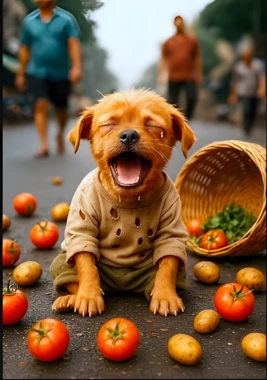
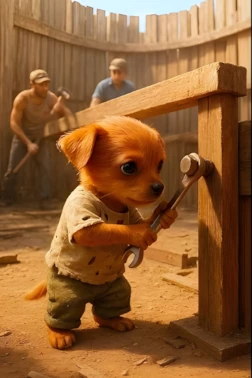
The poor puppy always wears torn clothes with holes, looks weak, but has a kind heart and struggles against hardships.
All stories must be set in India’s environment (villages, markets, buses, fields, streets, Indian houses, etc.).
All human characters (farmers, workers, bus conductors, shopkeepers, etc.) and locations must match the Indian atmosphere and culture.
Each story should be of similar length and detail as the examples below.
The stories must be heart-touching and emotional, showing the poor puppy’s suffering, his hard work, and finally his small success or dignity.
Keep the narration simple, clear, and storytelling style, just like a children’s storybook mixed with an emotional moral tone.
Examples (Follow this exact style, tone, and length):

Example Story 1

A poor puppy, dressed in torn clothes full of holes, sat in his little wooden house on the side of the road. Suddenly, some men with a crane arrived and began tearing down his home. The puppy begged them not to destroy it, but instead, they hit him and broke his house completely.

When the house collapsed, two rich puppies stood nearby and laughed loudly at his misery. The poor puppy cried bitterly, but soon he gathered courage and went to a farmer, asking for a job. The kind farmer agreed and hired him.

The poor puppy went to the market, bought seeds, placed them in a bucket, and sowed them in the ground. Soon, rain poured down. Sitting in the rain, covering his head with his little paws, the puppy watched his crops grow. Later, he sprayed his fields to protect them.

The farmer paid him his wages, and the poor puppy was overjoyed. He rushed to the market, and with his hard-earned money, he bought a strong plastic house. Sitting proudly inside his new home, the poor puppy felt truly happy for the first time.

Example Story 2

A poor puppy, wearing tattered clothes with holes, walked down the road with a stick on his shoulder. On both sides of the stick, small bundles of his belongings hung.

As he walked, a bus stopped in front of him. The poor puppy tried to climb aboard, but the conductor shoved him hard and threw him out. His belongings scattered across the road, and the poor puppy cried loudly in pain and humiliation.

Determined not to give up, he later found work in the fields, riding on a tractor and sowing rice crops. Rain poured heavily, and the poor puppy covered his head with a sack as he sat in the field, waiting for the rain to pass while guarding the crops.

In time, his employer paid him his wages. The puppy was filled with joy. He hurried to the market and bought six new sets of clothes.

The next time he boarded the bus, the same conductor, who had once insulted him, now welcomed him with respect and offered him a proper seat.

Now, using these two examples as the exact style guide, generate 5 completely new stories of the same type.
Disclaimer: These prompts are for educational purposes only. Results may vary depending on AI tool and customization.
Master Prompt For Motion
Below is the master prompt used to generate video ideas and structured scenes. This is for learning purposes. You may customize it for your AI tool.
I will provide you with a short story.
 Your task is to break down the story line by line (or sentence by sentence) and generate a detailed cinematic image prompt AND a motion prompt for each scene to be used in making a short video.

For each line of the story:

Identify the scene clearly.
Write a detailed cinematic image prompt in English that includes:
The poor puppy (torn dirty clothes, holes, weak but emotional).
The Indian environment (streets, farms, buses, huts, markets, etc. depending on the story).
The characters’ emotions (crying, happy, begging, working, smiling).
Background details (weather, crops, broken house, bus interior, village markets, etc.).
Camera angle, realism, lighting (example: cinematic wide shot, close-up, rainy atmosphere, soft natural light).
Immediately after the image prompt, also write a Motion Prompt that describes the small movements/actions in the scene, for example: wind blowing, puppy moving, tears falling, bus starting, people laughing, rain falling, crops swaying.
Keep both prompts detailed, consistent, and cinematic.
Output Format Example:

If the story line is: “A poor puppy sat outside his broken wooden house, crying.”

👉 The result should be:

Scene 1 Image Prompt:
 “Photorealistic 3D cinematic close-up of a poor puppy with torn dirty clothes full of holes, sitting outside a broken wooden hut on the side of an Indian village road, tears in his eyes, sad expression, cloudy sky, emotional atmosphere, natural lighting, highly detailed textures.”

Scene 1 Motion Prompt:
 “Tears slowly roll down the puppy’s cheeks, his body trembles in sadness, the leaves around him move gently with the wind, creating a sorrowful atmosphere.”

Insert Story Here:

[ Paste your selected story here ]


Now generate for every line of the story:

Number each scene (Scene 1, Scene 2, Scene 3…).
Provide both:

Image Prompt
Motion Prompt
Ensure the poor puppy’s appearance stays consistent in all scenes, and the Indian environment is realistic and detailed.
Disclaimer: These prompts are for educational purposes only. Results may vary depending on AI tool and customization.
Why These Prompts Work
Your prompts enforce structure by:
- Breaking stories into clear, numbered scenes.
- Defining mood, lighting, and environment consistently.
- Separating image prompts (what the frame looks like) from motion prompts (how it moves).
- Ensuring pacing by assigning similar duration to each scene.
This reduces guesswork and keeps your entire video visually coherent.
Customization Tips (Make It Your Own)
- Swap dogs for cats, foxes, or other animals.
- Change environments (city, forest, beach, snow, etc.).
- Experiment with different emotional tones (hopeful, tragic, heartwarming).
- Try different camera styles (slow zoom, slight pan, cinematic depth of field).
- Build a signature watermark style that matches your brand.
Common Beginner Mistakes to Avoid
No Branding — makes it harder to grow a recognizable channel.
Inconsistent Character Design — breaks viewer recognition.
Skipping Upscaling — results in blurry videos.
Poor Music Choice — ruins emotional impact.
Too Fast Scene Changes — confuses viewers.
Watch the Full Tutorial Video
If you prefer to watch this entire process in video form instead of reading the article, the video is available below.
Conclusion
Creating viral AI emotional dog and cat videos has never been easier. By following these exact steps — using free AI tools like ChatGPT, Google AI Studio, and ImageMover.ai — you can produce professional, monetizable videos that can get millions of views. The key is consistency and daily effort. Start today, create your first video, and keep improving. Many creators are earning thousands of dollars every month with this method. If you found this guide helpful, share it with others who want to grow on YouTube with AI content. Good luck, and I’ll see you in the next tutorial!